Neste tutorial você aprenderá a agendar a entrega de mensagens usando a API
Existem duas formas de agendar a entrega de uma mensagem para um horário e/ou dia posterior: especificando o dia e a hora exatos em que deseja que ela seja enviada ou indicando quantos minutos, horas ou dias você gostaria de adiar a entrega programada.
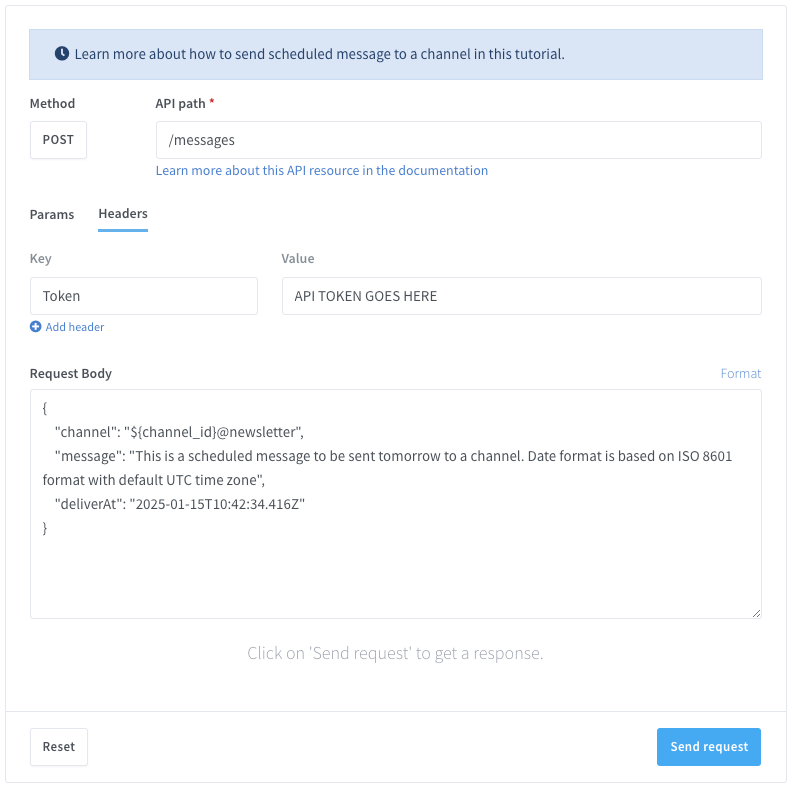
Se você quiser enviar mensagens a partir do código, pode usar qualquer linguagem de programação para realizar requisições HTTPS à API. Abaixo está o testador de API ao vivo com exemplos de código prontos para uso em várias linguagens de programação.
Requisitos
- Ter um número do WhatsApp já vinculado à plataforma e online.
- Número de telefone do destinatário com prefixo internacional no formato E.164. Exemplo:
+393517224449. Você pode validar o número de telefone aqui.
Endpoint da API
Neste tutorial usaremos o seguinte endpoint da API:
Preparar a requisição
URL alvo da API (POST)
https://api.wassenger.com/v1/messages
Cabeçalhos HTTPS obrigatórios
Content-Type: application/json
Token: ENTER API KEY HERE
Enviar uma mensagem em uma data específica no formato ISO8601
Exemplo de corpo da requisição em formato JSON
{ "channel": "${channel_ID}@newsletter", "message": "This is a scheduled message to be sent tomorrow to a channel. Date format is based on ISO 8601 format with default UTC time zone", "deliverAt": "2025-01-15T10:42:34.416Z" }
Parabéns! Você agora pode enviar mensagens automáticas usando a API para canais no WhatsApp.
🤩 🤖 Wassenger é uma solução completa de API para WhatsApp. Inscreva-se para um teste gratuito de 7 dias e comece em minutos!
Você é desenvolvedor?
Explore como usar o código no seu navegador sem instalar nenhum software.
Além disso, você pode encontrar diferentes linguagens para testar em Replit.com:
# Examples requires to have installed requests Python package.
# Install it by running: pip install requests
import requests
url = "https://api.wassenger.com/v1/messages"
payload = {
"channel": "${channel_id}@newsletter",
"message": "This is a scheduled message to be sent tomorrow to a channel.Date format is based on ISO 8601 format with default UTC time zone",
"deliverAt": "2025-01-15T10:42:34.416Z"
}
headers = {
"Content-Type": "application/json",
"Token": "API TOKEN GOES HERE"
}
response = requests.post(url, json=payload, headers=headers)
print(response.json())
<?php
$curl = curl_init();
curl_setopt_array($curl, [
  CURLOPT_URL => 'https://api.wassenger.com/v1/messages',
  CURLOPT_RETURNTRANSFER => true,
  CURLOPT_ENCODING => '',
  CURLOPT_MAXREDIRS => 10,
  CURLOPT_TIMEOUT => 30,
  CURLOPT_HTTP_VERSION => CURL_HTTP_VERSION_1_1,
  CURLOPT_CUSTOMREQUEST => 'POST',
  CURLOPT_POSTFIELDS => json_encode([
    'channel' => '${channel_id}@newsletter',
    'message' =>
      'This is a scheduled message to be sent tomorrow to a channel.Date format is based on ISO 8601 format with default UTC time zone',
    'deliverAt' => '2025-01-15T10:42:34.416Z',
  ]),
  CURLOPT_HTTPHEADER => [
    'Content-Type: application/json',
    'Token: API TOKEN GOES HERE',
  ],
]);
$response = curl_exec($curl);
$err = curl_error($curl);
curl_close($curl);
if ($err) {
  echo 'cURL Error #:' . $err;
} else {
  echo $response;
}
// This code example requires to have installed pecl_http package, a simple and elegant HTTP client for PHP.
// Install it by running: pecl install pecl_http
// More information: https://mdref.m6w6.name/http
<?php
$client = new http\Client();
$request = new http\Client\Request();
$body = new http\Message\Body();
$body->append(
  json_encode([
    'channel' => '${channel_id}@newsletter',
    'message' =>
      'This is a scheduled message to be sent tomorrow to a channel.Date format is based on ISO 8601 format with default UTC time zone',
    'deliverAt' => '2025-01-15T10:42:34.416Z',
  ])
);
$request->setRequestUrl('https://api.wassenger.com/v1/messages');
$request->setRequestMethod('POST');
$request->setBody($body);
$request->setHeaders([
  'Content-Type' => 'application/json',
  'Token' => 'API TOKEN GOES HERE',
]);
$client->enqueue($request)->send();
$response = $client->getResponse();
echo $response->getBody();
// This code example requires to have installed Guzzle package, a flexible and elegant HTTP client for PHP.
// Install it first following these instructions:
// https://docs.guzzlephp.org/en/stable/overview.html#installation
<?php
$client = new \GuzzleHttp\Client();
$response = $client->request('POST', 'https://api.wassenger.com/v1/messages', [
  'body' =>
    '{"channel":"${channel_id}@newsletter", "message":"This is a scheduled message to be sent tomorrow to a channel.Date format is based on ISO 8601 format with default UTC time zone", "deliverAt":"2025-01-15T10:42:34.416Z"}',
  'headers' => [
    'Content-Type' => 'application/json',
    'Token' => 'API TOKEN GOES HERE',
  ],
]);
echo $response->getBody();
// This code example requires to have installed pecl_http package, a simple and elegant HTTP client for PHP.
// Install it by running: pecl install pecl_http
// More information: https://mdref.m6w6.name/http
<?php
$client = new http\Client();
$request = new http\Client\Request();
$body = new http\Message\Body();
$body->append(
  json_encode([
    'channel' => '${channel_id}@newsletter',
    'message' =>
      'This is a scheduled message to be sent tomorrow to a channel.Date format is based on ISO 8601 format with default UTC time zone',
    'deliverAt' => '2025-01-15T10:42:34.416Z',
  ])
);
$request->setRequestUrl('https://api.wassenger.com/v1/messages');
$request->setRequestMethod('POST');
$request->setBody($body);
$request->setHeaders([
  'Content-Type' => 'application/json',
  'Token' => 'API TOKEN GOES HERE',
]);
$client->enqueue($request)->send();
$response = $client->getResponse();
echo $response->getBody();
- C# (RestClient)
// This code requires you to have installed RestSharp package.
// Documentation: https://restsharp.dev
// Installation: https://www.nuget.org/packages/RestSharp
var client = new RestClient("https://api.wassenger.com/v1/messages");
var request = new RestRequest(Method.POST);
request.AddHeader("Content-Type", "application/json");
request.AddHeader("Token", "API TOKEN GOES HERE");
request.AddParameter("application/json", "{\"channel\":\"${channel_id}@newsletter\", \"message\":\"This is a scheduled message to be sent tomorrow to a channel.Date format is based on ISO 8601 format with default UTC time zone\", \"deliverAt\":\"2025-01-15T10:42:34.416Z\"}", ParameterType.RequestBody);
IRestResponse response = client.Execute(request);
- C# (HttpClient)
// This code uses the built-in HttpClient package in the.NET framework.
// Documentation: https://docs.microsoft.com/en-us/dotnet/api/system.net.http.httpclient?view=net-6.0
using System.Net.Http.Headers;
var client = new HttpClient();
var request = new HttpRequestMessage
{
Method = HttpMethod.Post,
RequestUri = new Uri("https://api.wassenger.com/v1/messages"),
Headers =
{
{ "Token", "API TOKEN GOES HERE" },
},
Content = new StringContent("{\"channel\":\"${channel_id}@newsletter\", \"message\":\"This is a scheduled message to be sent tomorrow to a channel.Date format is based on ISO 8601 format with default UTC time zone\", \"deliverAt\":\"2025-01-15T10:42:34.416Z\"}")
{
Headers =
{
ContentType = new MediaTypeHeaderValue("application/json")
}
}
};
using(var response = await client.SendAsync(request))
{
response.EnsureSuccessStatusCode();
var body = await response.Content.ReadAsStringAsync();
Console.WriteLine(body);
}
// This code requires you to have installed Unirest package.
// Documentation: https://kong.github.io/unirest-java/#requests
// Installation: http://kong.github.io/unirest-java/
HttpResponse<String> response = Unirest.post("https://api.wassenger.com/v1/messages")
.header("Content-Type", "application/json")
.header("Token", "API TOKEN GOES HERE")
.body("{\"channel\":\"${channel_id}@newsletter\", \"message\":\"This is a scheduled message to be sent tomorrow to a channel.Date format is based on ISO 8601 format with default UTC time zone\", \"deliverAt\":\"2025-01-15T10:42:34.416Z\"}")
.asString();
$headers=@{}
$headers.Add("Content-Type", "application/json")
$headers.Add("Token", "API TOKEN GOES HERE")
$response = Invoke-WebRequest -Uri 'https://api.wassenger.com/v1/messages' -Method POST -Headers $headers -ContentType 'application/json' -Body '{"channel":"${channel_id}@newsletter", "message":"This is a scheduled message to be sent tomorrow to a channel.Date format is based on ISO 8601 format with default UTC time zone", "deliverAt":"2025-01-15T10:42:34.416Z"}'
require 'uri'
require 'net/http'
url = URI("https://api.wassenger.com/v1/messages")
http = Net::HTTP.new(url.host, url.port)
http.use_ssl = true
request = Net::HTTP::Post.new(url)
request["Content-Type"] = 'application/json'
request["Token"] = 'API TOKEN GOES HERE'
request.body = "{\"channel\":\"${channel_id}@newsletter\", \"message\":\"This is a scheduled message to be sent tomorrow to a channel.Date format is based on ISO 8601 format with default UTC time zone\", \"deliverAt\":\"2025-01-15T10:42:34.416Z\"}"
response = http.request(request)
puts response.read_body
package main
import(
"fmt"
"strings"
"net/http"
"io"
)
func main() {
url:= "https://api.wassenger.com/v1/messages"
payload:= strings.NewReader("{\"channel\":\"${channel_id}@newsletter\", \"message\":\"This is a scheduled message to be sent tomorrow to a channel.Date format is based on ISO 8601 format with default UTC time zone\", \"deliverAt\":\"2025-01-15T10:42:34.416Z\"}")
req, _:= http.NewRequest("POST", url, payload)
req.Header.Add("Content-Type", "application/json")
req.Header.Add("Token", "API TOKEN GOES HERE")
res, _:= http.DefaultClient.Do(req)
defer res.Body.Close()
body, _:= io.ReadAll(res.Body)
fmt.Println(res)
fmt.Println(string(body))
}
🤩 🤖 Wassenger é uma plataforma de comunicação completa e solução de API para WhatsApp. Explore mais de 100 casos de uso da API e automatize qualquer coisa no WhatsApp inscrevendo-se para um teste gratuito e começando em minutos!
Teste ao vivo para enviar uma mensagem para um grupo via API
Perguntas frequentes
Qual é a diferença entre enviar mensagens individuais e transmitir para um canal do WhatsApp?
Com o Wassenger, você pode enviar mensagens individuais para conversas personalizadas ou mensagens de transmissão através de campanhas para alcançar múltiplos destinatários simultaneamente. A transmissão permite segmentar grupos de clientes de forma eficiente enquanto cumpre as políticas de envio de mensagens do WhatsApp.
O Wassenger suporta agendamento de mensagens para canais do WhatsApp?
Com certeza. O Wassenger permite agendar mensagens para datas e horários específicos, garantindo comunicação pontual com seus clientes.
Existem limites no número de mensagens que posso enviar por dia?
O número de mensagens depende do tipo de conta WhatsApp Business e do plano contratado. O Wassenger fornece ferramentas para ajudá-lo a permanecer dentro das diretrizes do WhatsApp e evitar penalidades.
Posso incluir multimídia (imagens, vídeos, arquivos) em mensagens enviadas para canais do WhatsApp?
Sim, o Wassenger suporta mensagens multimídia, permitindo enviar imagens, vídeos, documentos e até notas de voz para contatos ou canais do WhatsApp.
Recursos úteis adicionais
Para mais detalhes sobre o endpoint da API, por favor consulte nossa documentação. Você encontrará todos os detalhes sobre os parâmetros aceitos na requisição, possíveis respostas de sucesso ou erro e exemplos de código prontos para uso em várias linguagens de programação.