La comunicazione efficiente è fondamentale per qualsiasi azienda, e con Funzione Departments di Wassenger puoi organizzare i membri del tuo team per specialità, assicurando che le chat siano assegnate alle persone giuste senza sforzo. 🚀
In questa guida ti mostreremo come usare PHP e Wassenger API per:
- Ottenere i dipartimenti del team
- Creare un nuovo dipartimento
- Aggiornare un dipartimento
- Eliminare un dipartimento
- Assegnare le chat ai dipartimenti
🤩 🤖 Wassenger è una soluzione API completa per WhatsApp. Iscriviti per una prova gratuita di 7 giorni e inizia in pochi minuti!
Perché usare i Dipartimenti in Wassenger? 🤔
Con i Dipartimenti puoi:
✅ Organizzare il tuo team — Raggruppare i membri del team per funzione o competenza.
✅ Migliorare il routing delle chat — Assegnare automaticamente le chat in arrivo al dipartimento o all'utente giusto.
✅ Aumentare l'efficienza — Ridurre i tempi di risposta inviando le chat direttamente a chi è più adatto a gestirle.
✅ Integrare senza soluzione di continuità con i ruoli del team — Funziona insieme ai ruoli amministratore, supervisore e agente senza modificare i loro permessi predefiniti.
🔗 Vuoi saperne di più sui Dipartimenti? Consulta la guida completa qui
Requisiti
- Avere un numero WhatsApp già collegato alla piattaforma e online.
- Usando l'API, interroga i dipartimenti disponibili nel tuo dispositivo per questo endpoint.
1. GET Departments con PHP
URL dell'API di destinazione usando il metodo GET
http://api.wassenger.com/v1/devices/{device_id}/departments
Header HTTPS richiesti > Ottieni la tua chiave API qui
Content-Type: application/json
Token: $API_TOKEN
Ottenere i Dipartimenti
Get Departments with PHP (Guzzle)
// This code example requires to have installed Guzzle package, a flexible and elegant HTTP client for PHP.
// Install it first following these instructions:
// https://docs.guzzlephp.org/en/stable/overview.html#installation
<?php
$client = new \GuzzleHttp\Client();
$response = $client->request(
  'GET',
  'https://api.wassenger.com/v1/devices/device.id/departments',
  [
    'headers' => [
      'Token' => 'ENTER API KEY HERE',
    ],
  ]
);
echo $response->getBody();
Get Departments with PHP (http2)
// This code example requires to have installed pecl_http package, a simple and elegant HTTP client for PHP.
// Install it by running: pecl install pecl_http
// More information: https://mdref.m6w6.name/http
<?php
$client = new http\Client();
$request = new http\Client\Request();
$request->setRequestUrl(
  'https://api.wassenger.com/v1/devices/device.id/departments'
);
$request->setRequestMethod('GET');
$request->setHeaders([
  'Token' => 'ENTER API KEY HERE',
]);
$client->enqueue($request)->send();
$response = $client->getResponse();
echo $response->getBody();
Get Departments with PHP (curl)
<?php
$curl = curl_init();
curl_setopt_array($curl, [
  CURLOPT_URL => 'https://api.wassenger.com/v1/devices/{{device.id}}/departments',
  CURLOPT_RETURNTRANSFER => true,
  CURLOPT_ENCODING => '',
  CURLOPT_MAXREDIRS => 10,
  CURLOPT_TIMEOUT => 30,
  CURLOPT_HTTP_VERSION => CURL_HTTP_VERSION_1_1,
  CURLOPT_CUSTOMREQUEST => 'GET',
  CURLOPT_HTTPHEADER => ['Token: ENTER API KEY HERE'],
]);
$response = curl_exec($curl);
$err = curl_error($curl);
curl_close($curl);
if ($err) {
  echo 'cURL Error #:' . $err;
} else {
  echo $response;
}
2. CREARE un nuovo Dipartimento con PHP
URL dell'API di destinazione usando il metodo POST
http://api.wassenger.com/v1/devices/{device_id}/departments
Header HTTPS richiesti > Ottieni la tua chiave API qui
Content-Type: application/json
Token: $API_TOKEN
Creare Dipartimento
{{AGENT_ID}} : Sostituisci questa espressione con il valore specifico
Create Departments with PHP (Guzzle)
// This code example requires to have installed Guzzle package, a flexible and elegant HTTP client for PHP.
// Install it first following these instructions:
// https://docs.guzzlephp.org/en/stable/overview.html#installation
<?php
$client = new \GuzzleHttp\Client();
$response = $client->request(
  'POST',
  'https://api.wassenger.com/v1/devices/device.id/departments',
  [
    'body' =>
      '{"name":"Sales", "color":"orange", "description":"Department for the Sales team", "agents":["{{AGENT_ID}}"]}',
    'headers' => [
      'Content-Type' => 'application/json',
      'Token' => 'ENTER API KEY HERE',
    ],
  ]
);
echo $response->getBody();
Create Departments with PHP (http2)
// This code example requires to have installed pecl_http package, a simple and elegant HTTP client for PHP.
// Install it by running: pecl install pecl_http
// More information: https://mdref.m6w6.name/http
<?php
$client = new http\Client();
$request = new http\Client\Request();
$body = new http\Message\Body();
$body->append(
  json_encode([
    'name' => 'Sales',
    'color' => 'orange',
    'description' => 'Department for the Sales team',
    'agents' => ['{{AGENT_ID}}'],
  ])
);
$request->setRequestUrl(
  'https://api.wassenger.com/v1/devices/device.id/departments'
);
$request->setRequestMethod('POST');
$request->setBody($body);
$request->setHeaders([
  'Content-Type' => 'application/json',
  'Token' => 'ENTER API KEY HERE',
]);
$client->enqueue($request)->send();
$response = $client->getResponse();
echo $response->getBody();
Create Departments with PHP (curl)
<?php
$curl = curl_init();
curl_setopt_array($curl, [
  CURLOPT_URL => 'https://api.wassenger.com/v1/devices/{{device.id}}/departments',
  CURLOPT_RETURNTRANSFER => true,
  CURLOPT_ENCODING => '',
  CURLOPT_MAXREDIRS => 10,
  CURLOPT_TIMEOUT => 30,
  CURLOPT_HTTP_VERSION => CURL_HTTP_VERSION_1_1,
  CURLOPT_CUSTOMREQUEST => 'POST',
  CURLOPT_POSTFIELDS => json_encode([
    'name' => 'Sales',
    'color' => 'orange',
    'description' => 'Department for the Sales team',
    'agents' => ['{{AGENT_ID}}'],
  ]),
  CURLOPT_HTTPHEADER => [
    'Content-Type: application/json',
    'Token: ENTER API KEY HERE',
  ],
]);
$response = curl_exec($curl);
$err = curl_error($curl);
curl_close($curl);
if ($err) {
  echo 'cURL Error #:' . $err;
} else {
  echo $response;
}
🤩 🤖 Wassenger è una soluzione API completa per WhatsApp. Iscriviti per una prova gratuita di 7 giorni e inizia in pochi minuti!
3. AGGIORNARE il Dipartimento con PHP
URL dell'API di destinazione usando il metodo PATCH
http://api.wassenger.com/v1/devices/{device_id}/departments
Header HTTPS richiesti > Ottieni la tua chiave API qui
Content-Type: application/json
Token: $API_TOKEN
Aggiorna Dipartimento
{{DEPARTMENT_ID}} : Sostituisci questa espressione con il valore specifico
{{AGENT_ID}} : Sostituisci questa espressione con il valore specifico
Update Departments with PHP (Guzzle)
// This code example requires to have installed Guzzle package, a flexible and elegant HTTP client for PHP.
// Install it first following these instructions:
// https://docs.guzzlephp.org/en/stable/overview.html#installation
<?php
$client = new \GuzzleHttp\Client();
$response = $client->request('PATCH', 'https://api.wassenger.com/v1/team', [
  'body' =>
    '{"department":"{{DEPARTMENT_ID}}", "name":"Marketing", "color":"purple", "description":"Department for the Marketing team", "agents":["{{AGENT_ID}}"]}',
  'headers' => [
    'Content-Type' => 'application/json',
    'Token' => 'ENTER API KEY HERE',
  ],
]);
echo $response->getBody();
Update Departments with PHP (http2)
// This code example requires to have installed pecl_http package, a simple and elegant HTTP client for PHP.
// Install it by running: pecl install pecl_http
// More information: https://mdref.m6w6.name/http
<?php
$client = new http\Client();
$request = new http\Client\Request();
$body = new http\Message\Body();
$body->append(
  json_encode([
    'department' => '{{DEPARTMENT_ID}}',
    'name' => 'Marketing',
    'color' => 'purple',
    'description' => 'Department for the Marketing team',
    'agents' => ['{{AGENT_ID}}'],
  ])
);
$request->setRequestUrl('https://api.wassenger.com/v1/team');
$request->setRequestMethod('PATCH');
$request->setBody($body);
$request->setHeaders([
  'Content-Type' => 'application/json',
  'Token' => 'ENTER API KEY HERE',
]);
$client->enqueue($request)->send();
$response = $client->getResponse();
echo $response->getBody();
Update Departments with PHP (curl)
<?php
$curl = curl_init();
curl_setopt_array($curl, [
  CURLOPT_URL => 'https://api.wassenger.com/v1/team',
  CURLOPT_RETURNTRANSFER => true,
  CURLOPT_ENCODING => '',
  CURLOPT_MAXREDIRS => 10,
  CURLOPT_TIMEOUT => 30,
  CURLOPT_HTTP_VERSION => CURL_HTTP_VERSION_1_1,
  CURLOPT_CUSTOMREQUEST => 'PATCH',
  CURLOPT_POSTFIELDS => json_encode([
    'department' => '{{DEPARTMENT_ID}}',
    'name' => 'Marketing',
    'color' => 'purple',
    'description' => 'Department for the Marketing team',
    'agents' => ['{{AGENT_ID}}'],
  ]),
  CURLOPT_HTTPHEADER => [
    'Content-Type: application/json',
    'Token: ENTER API KEY HERE',
  ],
]);
$response = curl_exec($curl);
$err = curl_error($curl);
curl_close($curl);
if ($err) {
  echo 'cURL Error #:' . $err;
} else {
  echo $response;
}
4. ELIMINARE il Dipartimento con PHP
URL dell'API di destinazione usando il metodo DELETE
http://api.wassenger.com/v1/devices/{device_id}/departments
Header HTTPS richiesti > Ottieni la tua chiave API qui
Content-Type: application/json
Token: $API_TOKEN
Elimina Dipartimento
{{DEPARTMENT_ID}} : Sostituisci questa espressione con il valore specifico
Delete Departments with PHP (Guzzle)
// This code example requires to have installed Guzzle package, a flexible and elegant HTTP client for PHP.
// Install it first following these instructions:
// https://docs.guzzlephp.org/en/stable/overview.html#installation
<?php
$client = new \GuzzleHttp\Client();
$response = $client->request(
  'DELETE',
  'https://api.wassenger.com/v1/devices/device.id/departments',
  [
    'body' => '{"department":"{{DEPARTMENT_ID}}"}',
    'headers' => [
      'Content-Type' => 'application/json',
      'Token' => 'ENTER API KEY HERE',
    ],
  ]
);
echo $response->getBody();
Delete Departments with PHP (http2)
// This code example requires to have installed pecl_http package, a simple and elegant HTTP client for PHP.
// Install it by running: pecl install pecl_http
// More information: https://mdref.m6w6.name/http
<?php
$client = new http\Client();
$request = new http\Client\Request();
$body = new http\Message\Body();
$body->append(
  json_encode([
    'department' => '{{DEPARTMENT_ID}}',
  ])
);
$request->setRequestUrl(
  'https://api.wassenger.com/v1/devices/device.id/departments'
);
$request->setRequestMethod('DELETE');
$request->setBody($body);
$request->setHeaders([
  'Content-Type' => 'application/json',
  'Token' => 'ENTER API KEY HERE',
]);
$client->enqueue($request)->send();
$response = $client->getResponse();
echo $response->getBody();
Delete Departments with PHP (curl)
<?php
$curl = curl_init();
curl_setopt_array($curl, [
  CURLOPT_URL => 'https://api.wassenger.com/v1/devices/{{device.id}}/departments',
  CURLOPT_RETURNTRANSFER => true,
  CURLOPT_ENCODING => '',
  CURLOPT_MAXREDIRS => 10,
  CURLOPT_TIMEOUT => 30,
  CURLOPT_HTTP_VERSION => CURL_HTTP_VERSION_1_1,
  CURLOPT_CUSTOMREQUEST => 'DELETE',
  CURLOPT_POSTFIELDS => json_encode([
    'department' => '{{DEPARTMENT_ID}}',
  ]),
  CURLOPT_HTTPHEADER => [
    'Content-Type: application/json',
    'Token: ENTER API KEY HERE',
  ],
]);
$response = curl_exec($curl);
$err = curl_error($curl);
curl_close($curl);
if ($err) {
  echo 'cURL Error #:' . $err;
} else {
  echo $response;
}
🤩 🤖 Wassenger è una piattaforma di comunicazione e soluzione API completa per WhatsApp. Esplora oltre 100+ casi d'uso API e automatizza qualsiasi cosa su WhatsApp iscrivendoti per una prova gratuita e iniziando in pochi minuti!
Test live per inviare un messaggio a un gruppo tramite API
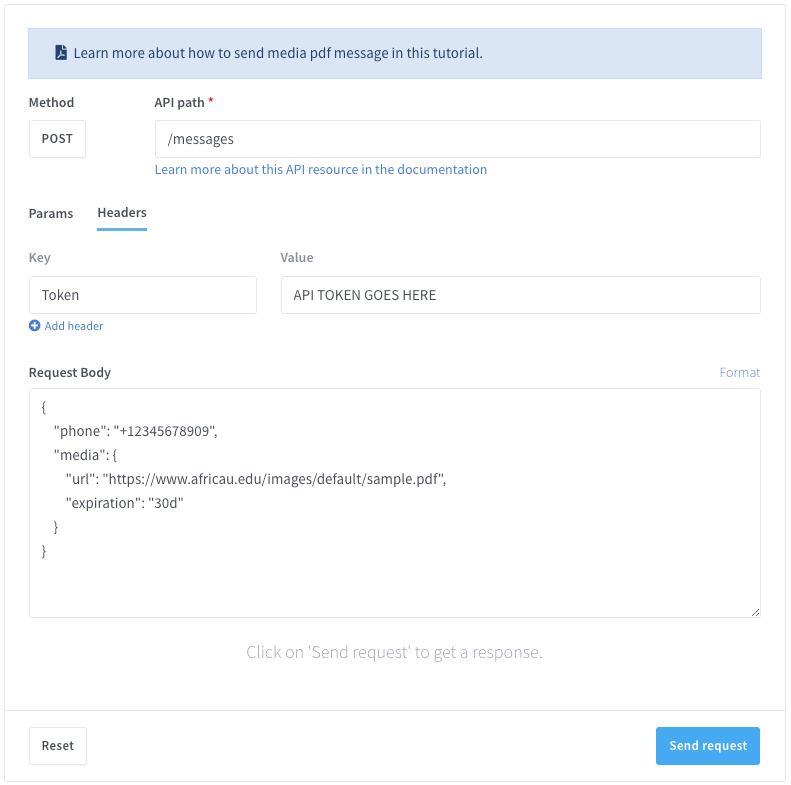
Prova subito il nostro tester API-Live!
Gestire i dipartimenti con Wassenger API in PHP permette alle aziende di semplificare le assegnazioni delle chat, migliorare l'efficienza e mantenere le conversazioni organizzate senza problemi.
📌 Smetti di gestire manualmente l'assegnazione delle chat! Automatizza, ottimizza e scala la tua attività senza sforzo con Wassenger. Inizia ora la tua prova gratuita!