A comunicação eficiente é fundamental para qualquer negócio, e com o recurso Departamentos da Wassenger, você pode organizar os membros da sua equipe por especialidade, garantindo que os chats sejam atribuídos às pessoas certas sem esforço. 🚀
Neste guia, vamos mostrar como usar PHP e a API da Wassenger para:
- Obter departamentos da equipe
- Criar um novo departamento
- Atualizar um departamento
- Excluir um departamento
- Atribuir chats a departamentos
🤩 🤖 Wassenger é uma solução completa de API para WhatsApp. Inscreva-se para um teste gratuito de 7 dias e comece em minutos!
Por que usar Departamentos no Wassenger? 🤔
Com os Departamentos, você pode:
✅ Organizar sua equipe — Agrupar membros da equipe por função ou especialidade.
✅ Melhorar o roteamento de chats — Atribuir automaticamente chats recebidos ao departamento ou usuário certo.
✅ Aumentar a eficiência — Reduzir o tempo de resposta enviando chats diretamente para quem está mais apto a atendê-los.
✅ Integrar-se perfeitamente com papéis da equipe — Funciona junto com os papéis de administrador, supervisor e agente sem alterar suas permissões padrão.
🔗 Quer saber mais sobre Departamentos? Confira o guia completo aqui
Requisitos
- Ter um número do WhatsApp já vinculado à plataforma e online.
- Usando a API, consulte os departamentos disponíveis no seu dispositivo para este endpoint.
1. GET Departamentos com PHP
URL alvo da API usando o método GET
http://api.wassenger.com/v1/devices/{device_id}/departments
Cabeçalhos HTTPS necessários > Obtenha sua chave de API aqui
Content-Type: application/json
Token: $API_TOKEN
Obter departamentos
Obter Departamentos com PHP (Guzzle)
// This code example requires to have installed Guzzle package, a flexible and elegant HTTP client for PHP.
// Install it first following these instructions:
// https://docs.guzzlephp.org/en/stable/overview.html#installation
<?php
$client = new \GuzzleHttp\Client();
$response = $client->request(
  'GET',
  'https://api.wassenger.com/v1/devices/device.id/departments',
  [
    'headers' => [
      'Token' => 'ENTER API KEY HERE',
    ],
  ]
);
echo $response->getBody();
Obter Departamentos com PHP (http2)
// This code example requires to have installed pecl_http package, a simple and elegant HTTP client for PHP.
// Install it by running: pecl install pecl_http
// More information: https://mdref.m6w6.name/http
<?php
$client = new http\Client();
$request = new http\Client\Request();
$request->setRequestUrl(
  'https://api.wassenger.com/v1/devices/device.id/departments'
);
$request->setRequestMethod('GET');
$request->setHeaders([
  'Token' => 'ENTER API KEY HERE',
]);
$client->enqueue($request)->send();
$response = $client->getResponse();
echo $response->getBody();
Obter Departamentos com PHP (curl)
<?php
$curl = curl_init();
curl_setopt_array($curl, [
  CURLOPT_URL => 'https://api.wassenger.com/v1/devices/{{device.id}}/departments',
  CURLOPT_RETURNTRANSFER => true,
  CURLOPT_ENCODING => '',
  CURLOPT_MAXREDIRS => 10,
  CURLOPT_TIMEOUT => 30,
  CURLOPT_HTTP_VERSION => CURL_HTTP_VERSION_1_1,
  CURLOPT_CUSTOMREQUEST => 'GET',
  CURLOPT_HTTPHEADER => ['Token: ENTER API KEY HERE'],
]);
$response = curl_exec($curl);
$err = curl_error($curl);
curl_close($curl);
if ($err) {
  echo 'cURL Error #:' . $err;
} else {
  echo $response;
}
2. CRIAR um Novo Departamento com PHP
URL alvo da API usando o método POST
http://api.wassenger.com/v1/devices/{device_id}/departments
Cabeçalhos HTTPS necessários > Obtenha sua chave de API aqui
Content-Type: application/json
Token: $API_TOKEN
Criar Departamento
{{AGENT_ID}} : Substitua esta expressão pelo valor específico
Criar Departamentos com PHP (Guzzle)
// This code example requires to have installed Guzzle package, a flexible and elegant HTTP client for PHP.
// Install it first following these instructions:
// https://docs.guzzlephp.org/en/stable/overview.html#installation
<?php
$client = new \GuzzleHttp\Client();
$response = $client->request(
  'POST',
  'https://api.wassenger.com/v1/devices/device.id/departments',
  [
    'body' =>
      '{"name":"Sales", "color":"orange", "description":"Department for the Sales team", "agents":["{{AGENT_ID}}"]}',
    'headers' => [
      'Content-Type' => 'application/json',
      'Token' => 'ENTER API KEY HERE',
    ],
  ]
);
echo $response->getBody();
Criar Departamentos com PHP (http2)
// This code example requires to have installed pecl_http package, a simple and elegant HTTP client for PHP.
// Install it by running: pecl install pecl_http
// More information: https://mdref.m6w6.name/http
<?php
$client = new http\Client();
$request = new http\Client\Request();
$body = new http\Message\Body();
$body->append(
  json_encode([
    'name' => 'Sales',
    'color' => 'orange',
    'description' => 'Department for the Sales team',
    'agents' => ['{{AGENT_ID}}'],
  ])
);
$request->setRequestUrl(
  'https://api.wassenger.com/v1/devices/device.id/departments'
);
$request->setRequestMethod('POST');
$request->setBody($body);
$request->setHeaders([
  'Content-Type' => 'application/json',
  'Token' => 'ENTER API KEY HERE',
]);
$client->enqueue($request)->send();
$response = $client->getResponse();
echo $response->getBody();
Criar Departamentos com PHP (curl)
<?php
$curl = curl_init();
curl_setopt_array($curl, [
  CURLOPT_URL => 'https://api.wassenger.com/v1/devices/{{device.id}}/departments',
  CURLOPT_RETURNTRANSFER => true,
  CURLOPT_ENCODING => '',
  CURLOPT_MAXREDIRS => 10,
  CURLOPT_TIMEOUT => 30,
  CURLOPT_HTTP_VERSION => CURL_HTTP_VERSION_1_1,
  CURLOPT_CUSTOMREQUEST => 'POST',
  CURLOPT_POSTFIELDS => json_encode([
    'name' => 'Sales',
    'color' => 'orange',
    'description' => 'Department for the Sales team',
    'agents' => ['{{AGENT_ID}}'],
  ]),
  CURLOPT_HTTPHEADER => [
    'Content-Type: application/json',
    'Token: ENTER API KEY HERE',
  ],
]);
$response = curl_exec($curl);
$err = curl_error($curl);
curl_close($curl);
if ($err) {
  echo 'cURL Error #:' . $err;
} else {
  echo $response;
}
🤩 🤖 Wassenger é uma solução completa de API para WhatsApp. Inscreva-se para um teste gratuito de 7 dias e comece em minutos!
3. ATUALIZAR Departamento com PHP
URL alvo da API usando o método PATCH
http://api.wassenger.com/v1/devices/{device_id}/departments
Cabeçalhos HTTPS necessários > Obtenha sua chave de API aqui
Content-Type: application/json
Token: $API_TOKEN
Atualizar Departamento
{{DEPARTMENT_ID}} : Substitua esta expressão pelo valor específico
{{AGENT_ID}} : Substitua esta expressão pelo valor específico
Atualizar Departamentos com PHP (Guzzle)
// This code example requires to have installed Guzzle package, a flexible and elegant HTTP client for PHP.
// Install it first following these instructions:
// https://docs.guzzlephp.org/en/stable/overview.html#installation
<?php
$client = new \GuzzleHttp\Client();
$response = $client->request('PATCH', 'https://api.wassenger.com/v1/team', [
  'body' =>
    '{"department":"{{DEPARTMENT_ID}}", "name":"Marketing", "color":"purple", "description":"Department for the Marketing team", "agents":["{{AGENT_ID}}"]}',
  'headers' => [
    'Content-Type' => 'application/json',
    'Token' => 'ENTER API KEY HERE',
  ],
]);
echo $response->getBody();
Atualizar Departamentos com PHP (http2)
// This code example requires to have installed pecl_http package, a simple and elegant HTTP client for PHP.
// Install it by running: pecl install pecl_http
// More information: https://mdref.m6w6.name/http
<?php
$client = new http\Client();
$request = new http\Client\Request();
$body = new http\Message\Body();
$body->append(
  json_encode([
    'department' => '{{DEPARTMENT_ID}}',
    'name' => 'Marketing',
    'color' => 'purple',
    'description' => 'Department for the Marketing team',
    'agents' => ['{{AGENT_ID}}'],
  ])
);
$request->setRequestUrl('https://api.wassenger.com/v1/team');
$request->setRequestMethod('PATCH');
$request->setBody($body);
$request->setHeaders([
  'Content-Type' => 'application/json',
  'Token' => 'ENTER API KEY HERE',
]);
$client->enqueue($request)->send();
$response = $client->getResponse();
echo $response->getBody();
Atualizar Departamentos com PHP (curl)
<?php
$curl = curl_init();
curl_setopt_array($curl, [
  CURLOPT_URL => 'https://api.wassenger.com/v1/team',
  CURLOPT_RETURNTRANSFER => true,
  CURLOPT_ENCODING => '',
  CURLOPT_MAXREDIRS => 10,
  CURLOPT_TIMEOUT => 30,
  CURLOPT_HTTP_VERSION => CURL_HTTP_VERSION_1_1,
  CURLOPT_CUSTOMREQUEST => 'PATCH',
  CURLOPT_POSTFIELDS => json_encode([
    'department' => '{{DEPARTMENT_ID}}',
    'name' => 'Marketing',
    'color' => 'purple',
    'description' => 'Department for the Marketing team',
    'agents' => ['{{AGENT_ID}}'],
  ]),
  CURLOPT_HTTPHEADER => [
    'Content-Type: application/json',
    'Token: ENTER API KEY HERE',
  ],
]);
$response = curl_exec($curl);
$err = curl_error($curl);
curl_close($curl);
if ($err) {
  echo 'cURL Error #:' . $err;
} else {
  echo $response;
}
4. EXCLUIR Departamento com PHP
URL alvo da API usando o método DELETE
http://api.wassenger.com/v1/devices/{device_id}/departments
Cabeçalhos HTTPS necessários > Obtenha sua chave de API aqui
Content-Type: application/json
Token: $API_TOKEN
Excluir Departamento
{{DEPARTMENT_ID}} : Substitua esta expressão pelo valor específico
Excluir Departamentos com PHP (Guzzle)
// This code example requires to have installed Guzzle package, a flexible and elegant HTTP client for PHP.
// Install it first following these instructions:
// https://docs.guzzlephp.org/en/stable/overview.html#installation
<?php
$client = new \GuzzleHttp\Client();
$response = $client->request(
  'DELETE',
  'https://api.wassenger.com/v1/devices/device.id/departments',
  [
    'body' => '{"department":"{{DEPARTMENT_ID}}"}',
    'headers' => [
      'Content-Type' => 'application/json',
      'Token' => 'ENTER API KEY HERE',
    ],
  ]
);
echo $response->getBody();
Excluir Departamentos com PHP (http2)
// This code example requires to have installed pecl_http package, a simple and elegant HTTP client for PHP.
// Install it by running: pecl install pecl_http
// More information: https://mdref.m6w6.name/http
<?php
$client = new http\Client();
$request = new http\Client\Request();
$body = new http\Message\Body();
$body->append(
  json_encode([
    'department' => '{{DEPARTMENT_ID}}',
  ])
);
$request->setRequestUrl(
  'https://api.wassenger.com/v1/devices/device.id/departments'
);
$request->setRequestMethod('DELETE');
$request->setBody($body);
$request->setHeaders([
  'Content-Type' => 'application/json',
  'Token' => 'ENTER API KEY HERE',
]);
$client->enqueue($request)->send();
$response = $client->getResponse();
echo $response->getBody();
Excluir Departamentos com PHP (curl)
<?php
$curl = curl_init();
curl_setopt_array($curl, [
  CURLOPT_URL => 'https://api.wassenger.com/v1/devices/{{device.id}}/departments',
  CURLOPT_RETURNTRANSFER => true,
  CURLOPT_ENCODING => '',
  CURLOPT_MAXREDIRS => 10,
  CURLOPT_TIMEOUT => 30,
  CURLOPT_HTTP_VERSION => CURL_HTTP_VERSION_1_1,
  CURLOPT_CUSTOMREQUEST => 'DELETE',
  CURLOPT_POSTFIELDS => json_encode([
    'department' => '{{DEPARTMENT_ID}}',
  ]),
  CURLOPT_HTTPHEADER => [
    'Content-Type: application/json',
    'Token: ENTER API KEY HERE',
  ],
]);
$response = curl_exec($curl);
$err = curl_error($curl);
curl_close($curl);
if ($err) {
  echo 'cURL Error #:' . $err;
} else {
  echo $response;
}
🤩 🤖 Wassenger é uma plataforma de comunicação completa e solução de API para WhatsApp. Explore mais de 100 casos de uso da API e automatize qualquer coisa no WhatsApp inscrevendo-se para um teste gratuito e começando em minutos!
Teste ao vivo para enviar uma mensagem para um grupo via API
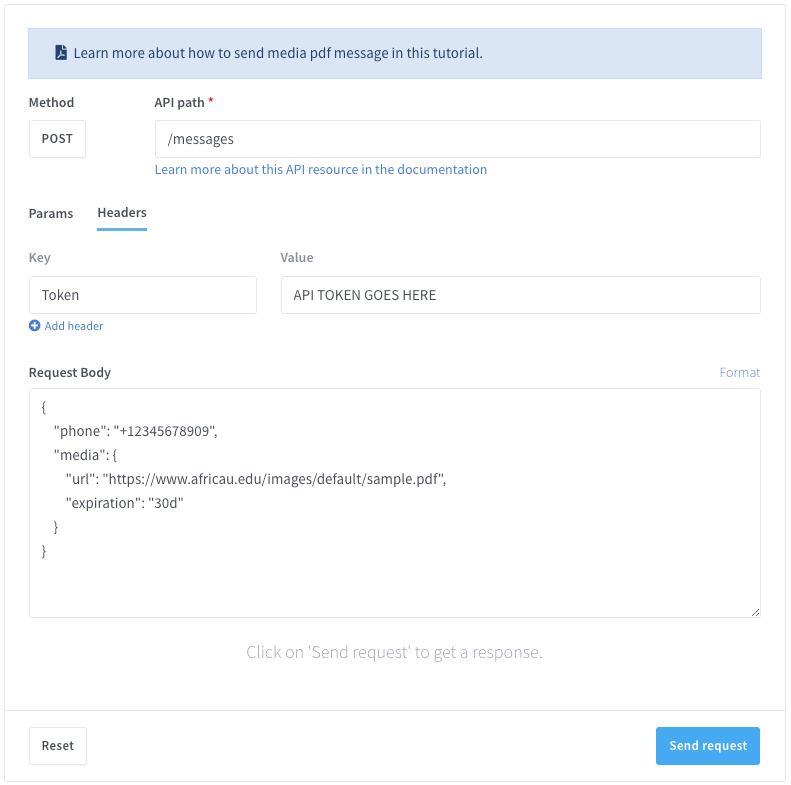
Experimente nosso API-Live tester agora!
Gerenciar departamentos com a API da Wassenger em PHP permite que empresas otimizem a atribuição de chats, melhorem a eficiência e mantenham as conversas organizadas sem complicações.
📌 Pare de gerenciar atribuições de chats manualmente! Automatize, otimize e escale seu negócio sem esforço com a Wassenger. Comece seu teste gratuito agora!