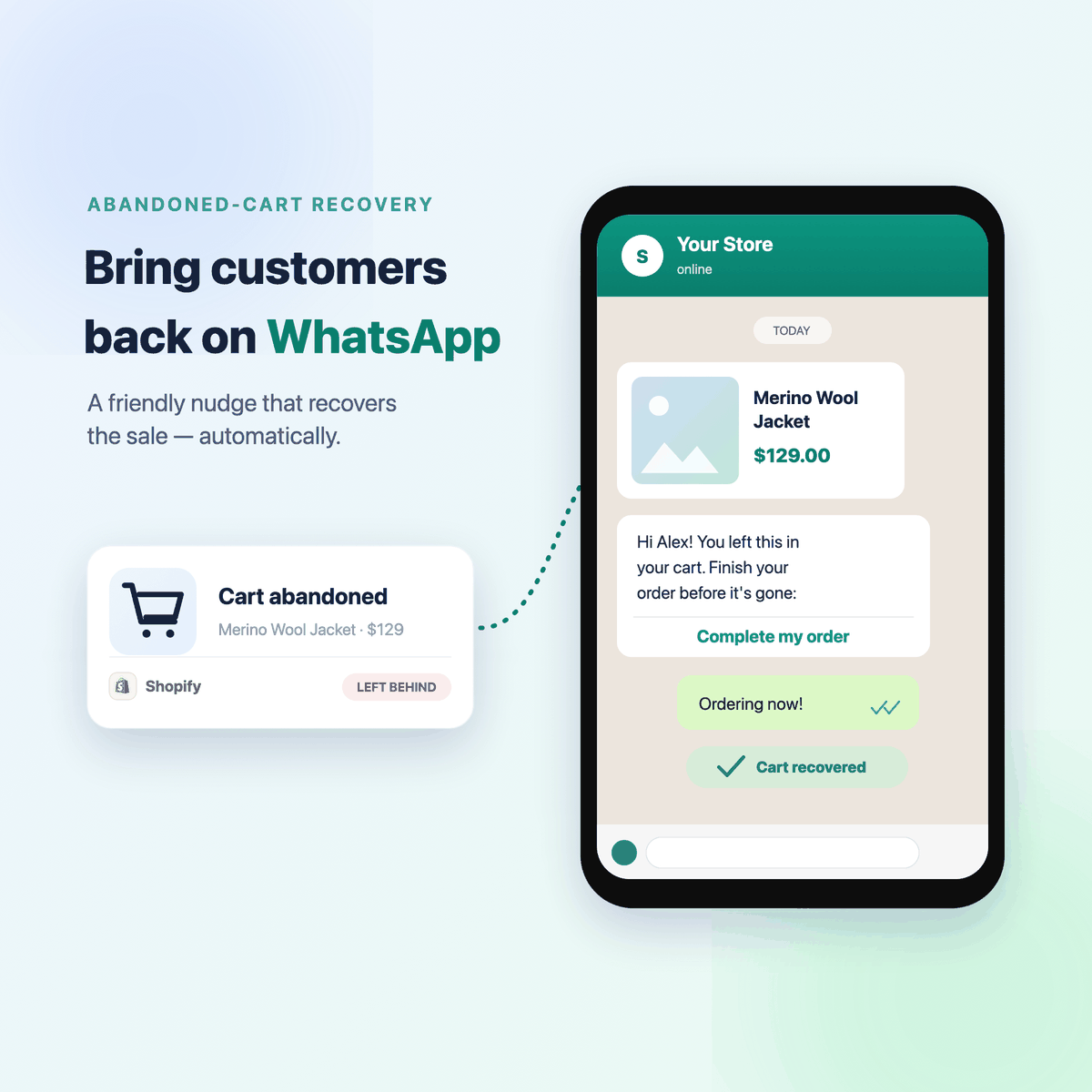
Roughly 7 in 10 customers who add something to their cart leave without paying. Most stores try to win them back by email — but most emails are never opened. WhatsApp is different: almost every message gets read, usually within minutes. So a short, friendly nudge — "Hi Alex, you left the Merino Wool Jacket behind. Here's your link to finish." — brings a real share of those customers back.
The best part: you can set this up yourself. No code, no developer, no technical knowledge. Wassenger is the easiest way to automate WhatsApp for your business, and this guide walks you through the exact path — from start to your first recovered sale.
What you're setting up
When a customer leaves your Shopify store mid-checkout, they automatically receive a WhatsApp message with their name, the product they left behind, and a link straight back to the checkout. Still no purchase? An optional message the next day adds a small coupon. That's the whole thing — and once it's on, it runs by itself.
You connect three things, one time:
- Shopify — it already detects abandoned carts for you, on every plan.
- Wassenger — the easiest, no-code way to automate and send your WhatsApp messages.
- Your WhatsApp number — on the official WhatsApp Business API.
Here's how, step by step.
Wassenger does the recovering. It sends the reminder, waits, follows up, and closes the sale. Shopify's only job is to tell Wassenger the moment a cart is abandoned — it can't send WhatsApp itself. Think of it as the doorbell; Wassenger is the salesperson.
Step 1 · Create your Wassenger account
Go to app.wassenger.com/register and sign up. It takes a minute.
Step 2 · Connect your WhatsApp number
Inside Wassenger, connect your number on the official WhatsApp Business API (powered by Meta). Wassenger guides you through registering the number with Meta — you can use a brand-new number or bring your existing business one.
Step 3 · Create your reminder message
WhatsApp asks businesses to use an approved message template for reminders like this. It's a Meta rule, and it's what keeps WhatsApp free of spam. In Wassenger, create a simple template with three blanks — the customer's name, the product, and the recovery link — and submit it. Approval usually takes up to 24 hours. Already have one? Skip ahead.
Two simple rules keep you on the right side of the line:
- Only message customers who gave you permission (add a WhatsApp opt-in at checkout).
- Always stop messaging anyone who replies STOP.
Step 4 · Build your recovery flow in Wassenger
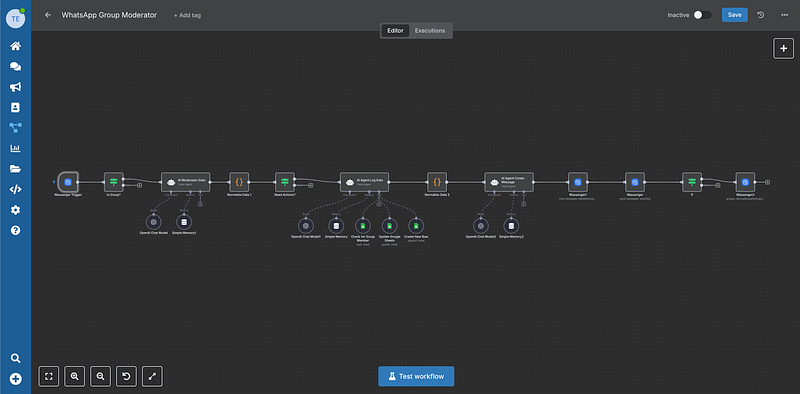
In Wassenger, open Flows and create your recovery flow (it's included from the Business plan and up). The flow checks that the customer left a phone number, sends the reminder, waits a day, and sends a follow-up with a coupon — like this:
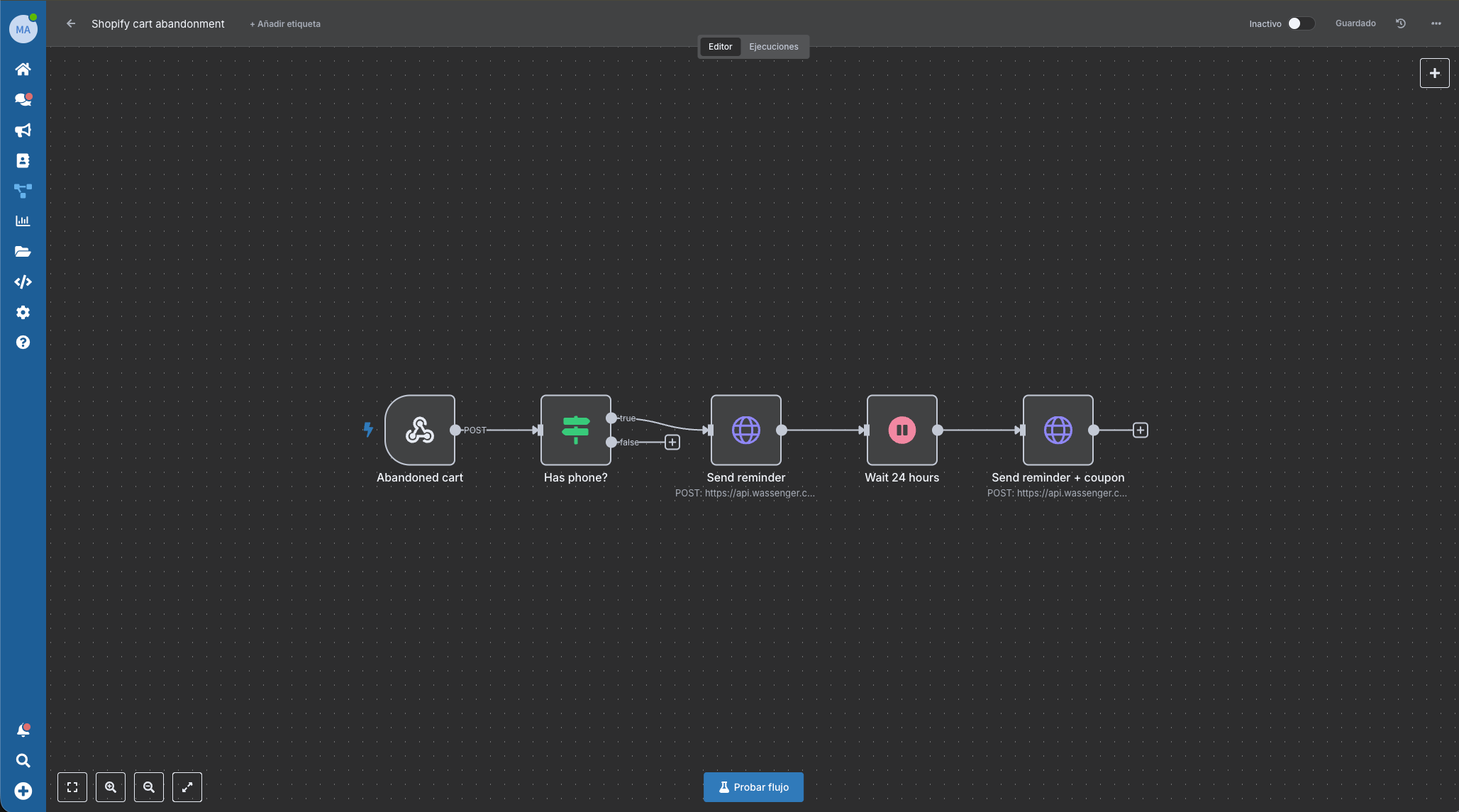
You don't build it from a blank canvas — the editor lets you drop these steps in with a few clicks.
Want a head start? Import this ready-made flow into the editor, then set your API key, device, and template names:
{
  "name": "WhatsApp abandoned-cart recovery",
  "nodes": [
    { "parameters": { "httpMethod": "POST", "path": "abandoned-cart", "responseMode": "onReceived", "options": {} },
      "id": "a1", "name": "Abandoned cart", "type": "n8n-nodes-base.webhook", "typeVersion": 2, "position": [260, 300], "webhookId": "abandoned-cart" },
    { "parameters": { "conditions": { "options": { "caseSensitive": true, "leftValue": "", "typeValidation": "loose", "version": 2 }, "conditions": [ { "id": "c1a2b3", "leftValue": "={{ $json.body.phone }}", "rightValue": "", "operator": { "type": "string", "operation": "notEmpty", "singleValue": true } } ], "combinator": "and" }, "options": {} },
      "id": "a2", "name": "Has phone?", "type": "n8n-nodes-base.if", "typeVersion": 2.2, "position": [480, 300] },
    { "parameters": { "method": "POST", "url": "https://api.wassenger.com/v1/messages", "sendHeaders": true, "headerParameters": { "parameters": [ { "name": "Token", "value": "YOUR_API_KEY" }, { "name": "Content-Type", "value": "application/json" } ] }, "sendBody": true, "specifyBody": "json", "jsonBody": "={ \"device\": \"YOUR_DEVICE_ID\", \"phone\": \"{{ $('Abandoned cart').item.json.body.phone }}\", \"template\": { \"name\": \"abandoned_checkout_reminder\", \"language\": \"en\", \"components\": [ { \"type\": \"body\", \"parameters\": [ { \"type\": \"text\", \"text\": \"{{ $('Abandoned cart').item.json.body.first_name }}\" }, { \"type\": \"text\", \"text\": \"{{ $('Abandoned cart').item.json.body.product }}\" }, { \"type\": \"text\", \"text\": \"{{ $('Abandoned cart').item.json.body.recovery_url }}\" } ] } ] } }", "options": {} },
      "id": "a3", "name": "Send reminder", "type": "n8n-nodes-base.httpRequest", "typeVersion": 4.2, "position": [720, 300] },
    { "parameters": { "amount": 24, "unit": "hours", "resume": "timeInterval" },
      "id": "a4", "name": "Wait 24 hours", "type": "n8n-nodes-base.wait", "typeVersion": 1, "position": [940, 300], "webhookId": "wait-24h" },
    { "parameters": { "method": "POST", "url": "https://api.wassenger.com/v1/messages", "sendHeaders": true, "headerParameters": { "parameters": [ { "name": "Token", "value": "YOUR_API_KEY" }, { "name": "Content-Type", "value": "application/json" } ] }, "sendBody": true, "specifyBody": "json", "jsonBody": "={ \"device\": \"YOUR_DEVICE_ID\", \"phone\": \"{{ $('Abandoned cart').item.json.body.phone }}\", \"template\": { \"name\": \"abandoned_checkout_reminder_coupon\", \"language\": \"en\", \"components\": [ { \"type\": \"body\", \"parameters\": [ { \"type\": \"text\", \"text\": \"{{ $('Abandoned cart').item.json.body.first_name }}\" }, { \"type\": \"text\", \"text\": \"{{ $('Abandoned cart').item.json.body.product }}\" }, { \"type\": \"text\", \"text\": \"{{ $('Abandoned cart').item.json.body.recovery_url }}\" } ] } ] } }", "options": {} },
      "id": "a5", "name": "Send reminder + coupon", "type": "n8n-nodes-base.httpRequest", "typeVersion": 4.2, "position": [1160, 300] }
  ],
  "connections": {
    "Abandoned cart": { "main": [[{ "node": "Has phone?", "type": "main", "index": 0 }]] },
    "Has phone?": { "main": [[{ "node": "Send reminder", "type": "main", "index": 0 }], []] },
    "Send reminder": { "main": [[{ "node": "Wait 24 hours", "type": "main", "index": 0 }]] },
    "Wait 24 hours": { "main": [[{ "node": "Send reminder + coupon", "type": "main", "index": 0 }]] }
  },
  "active": false, "settings": { "executionOrder": "v1" }, "pinData": {}
}
Now copy your webhook URL — it's the single link that connects Shopify to Wassenger:
- Open the flow's first node, Abandoned cart (it's a webhook).
- Copy its URL — the address Shopify will send each abandoned cart to.
- Keep it for the next step, where you paste it into Shopify.
Step 5 · Connect Shopify (it just signals Wassenger)
Shopify Flow can't send WhatsApp — its only job is to ping Wassenger the moment a cart is abandoned. The link between them is one URL: Shopify Flow → (sends the cart data) → your Wassenger webhook → Wassenger sends the WhatsApp. Set it up once:
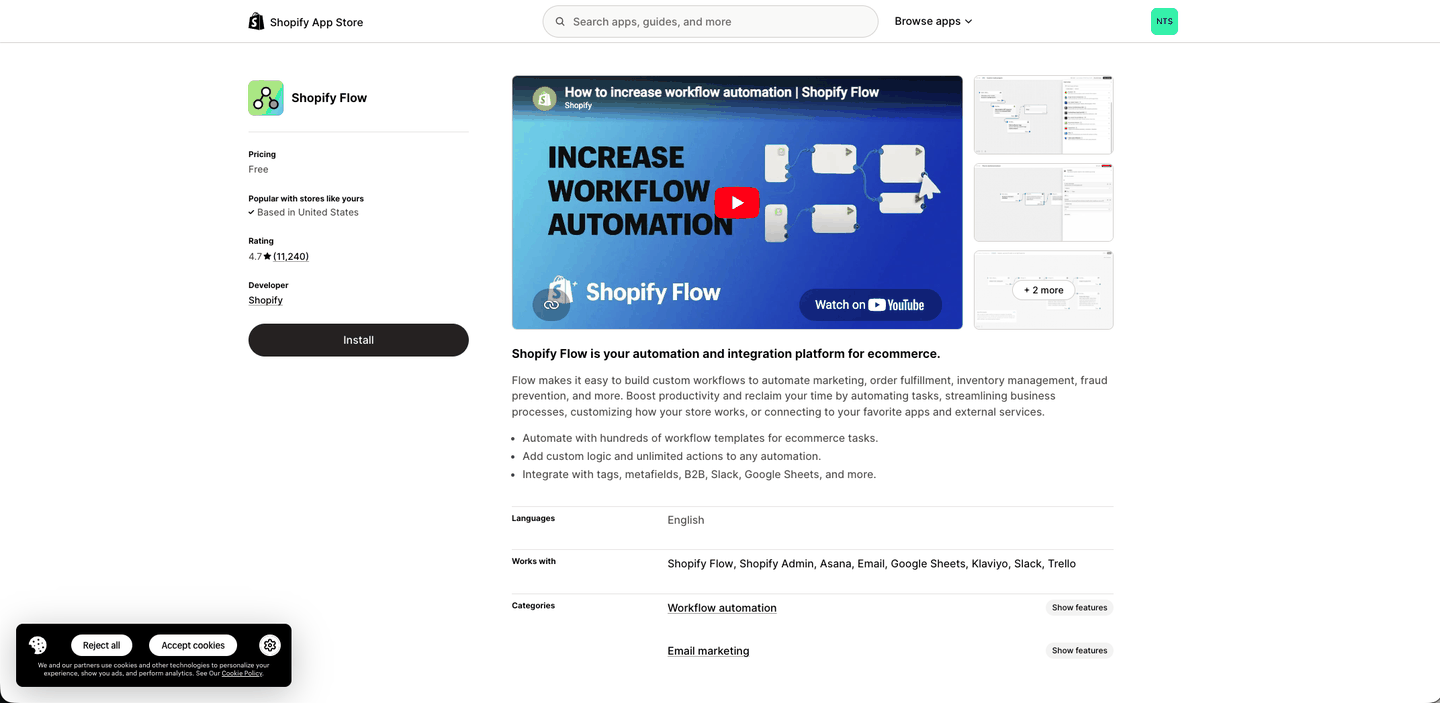
In your Shopify admin, open the App Store and install Shopify Flow. It's free, it's made by Shopify, and it's the piece that tells Wassenger the moment a cart is abandoned.
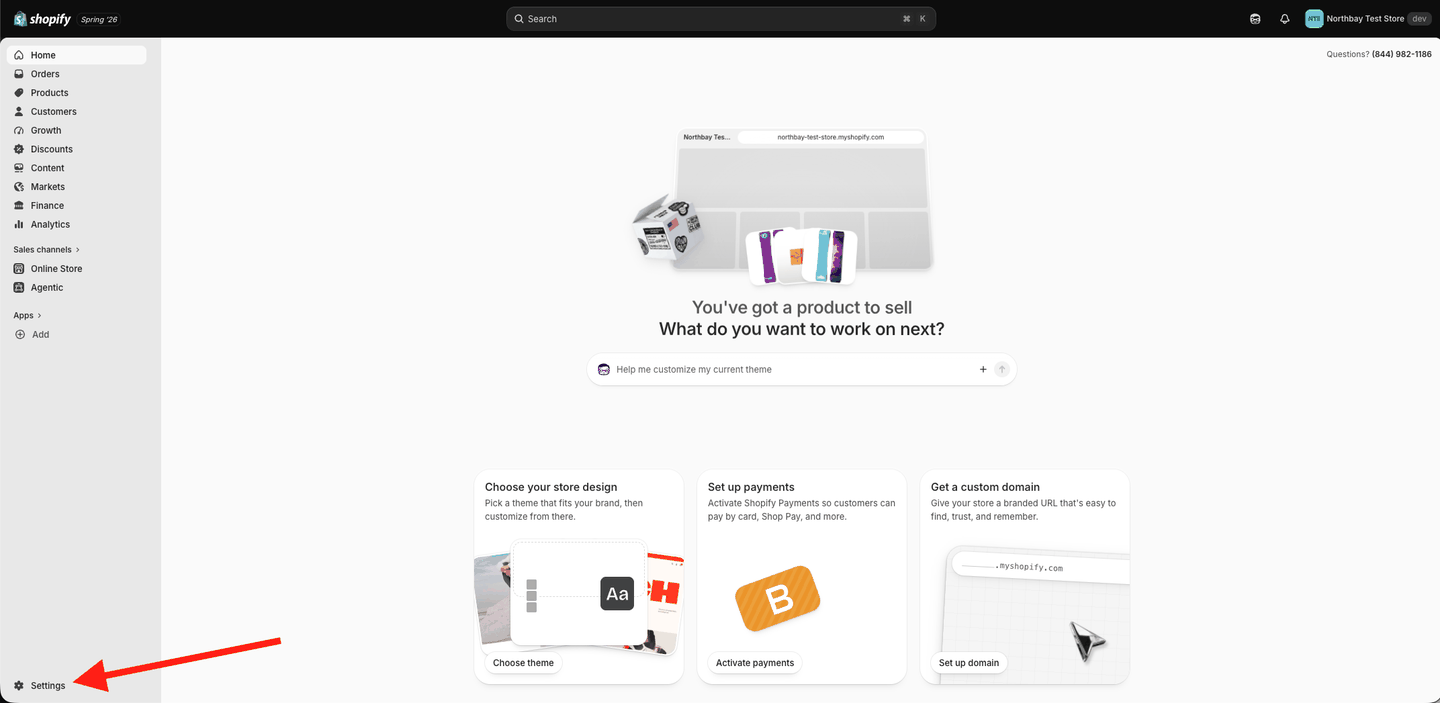
Search for Shopify Flow and click Install.
Now tell Shopify to trigger that flow whenever someone abandons a cart. Open the Shopify Flow app and:
1. Click Create workflow.
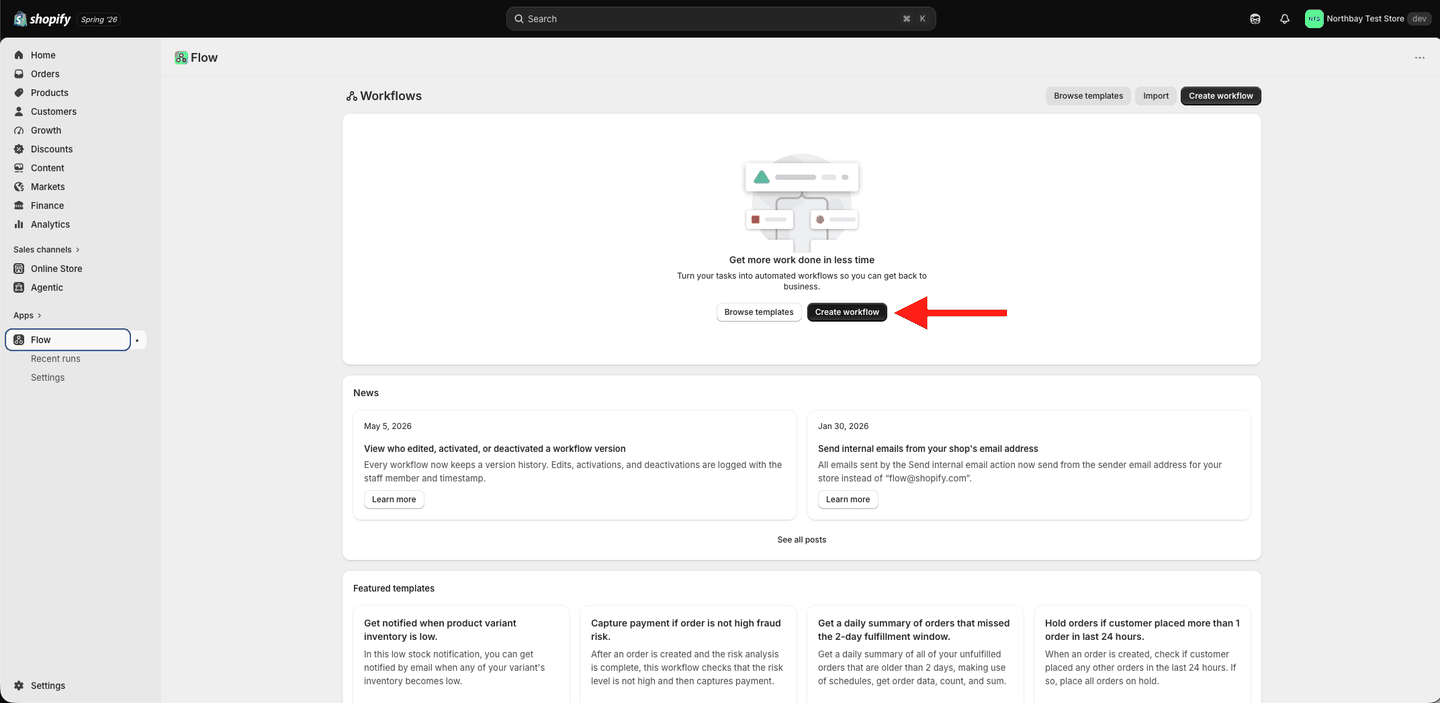
2. Click Add trigger, search abandons, and pick Customer abandons checkout. Then click the + below it.
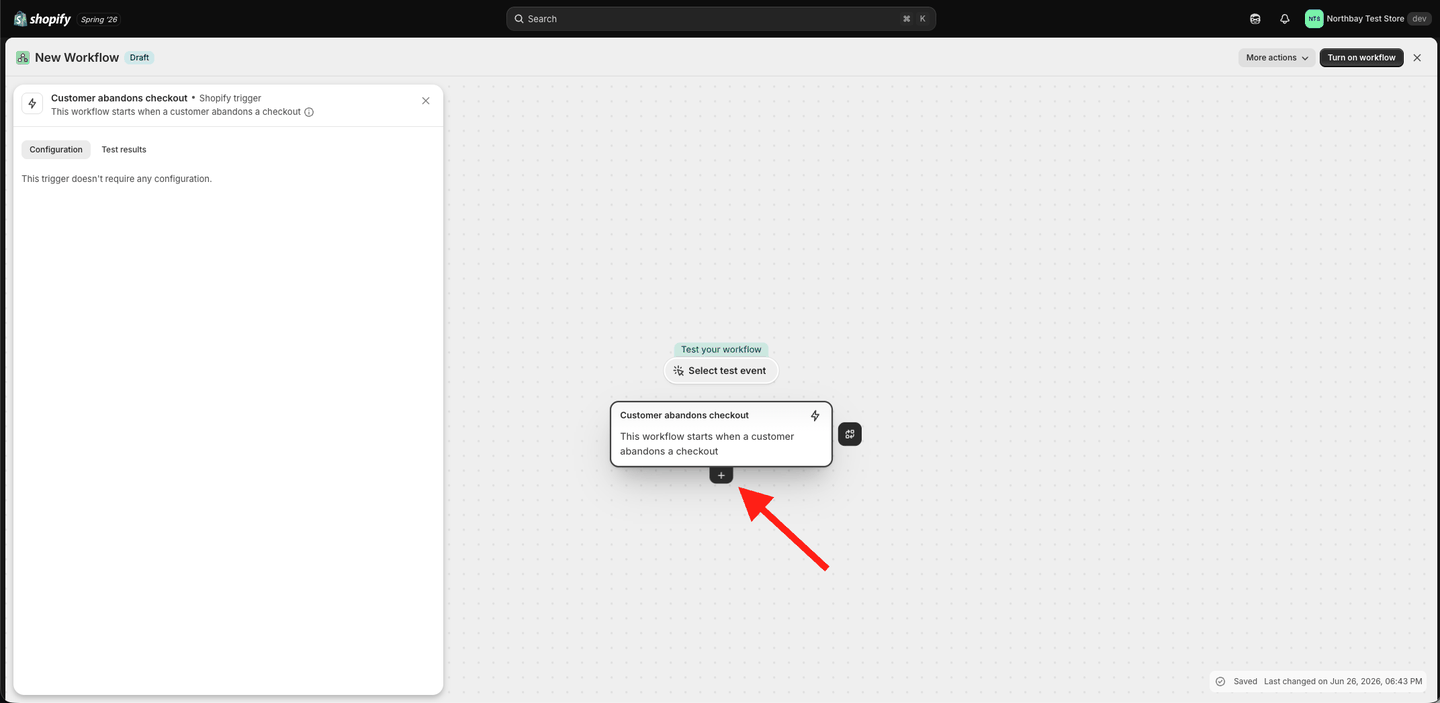
3. Choose Action.
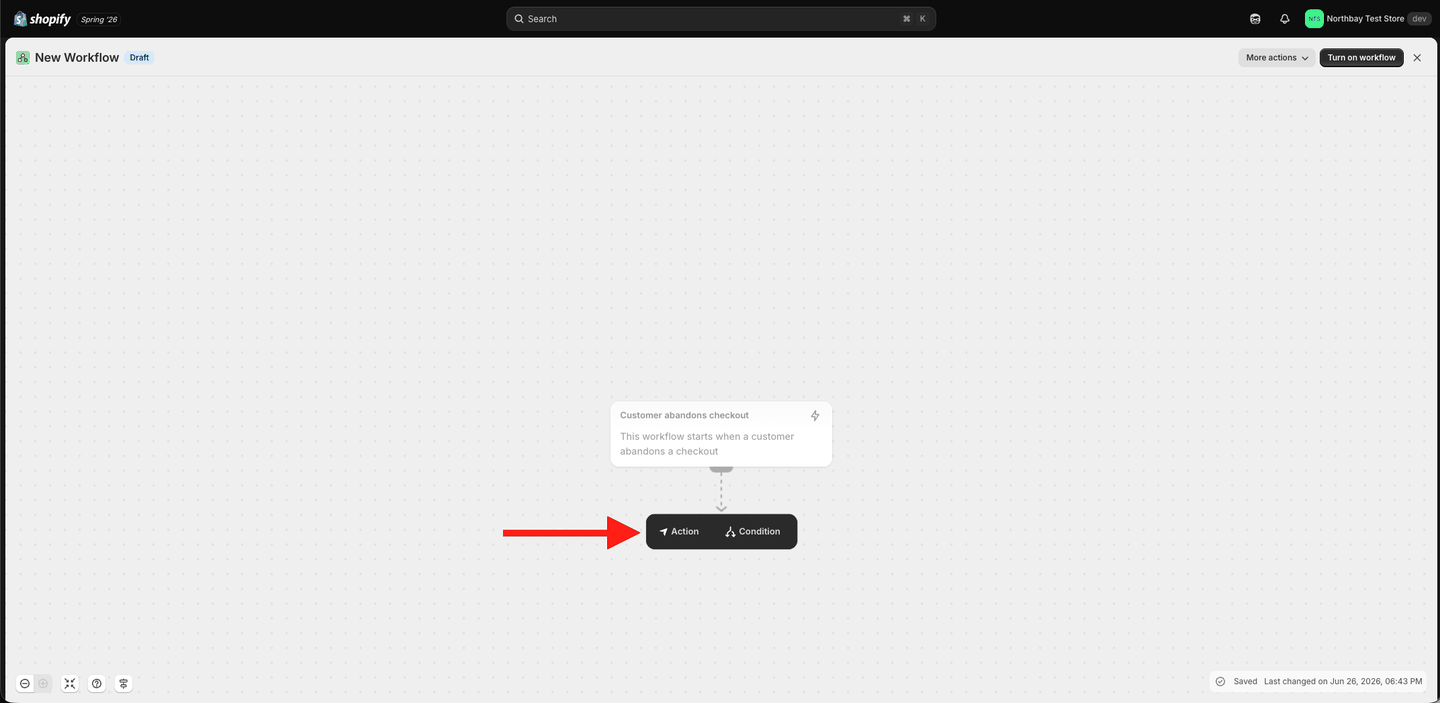
4. Search Send HTTP request and select it.
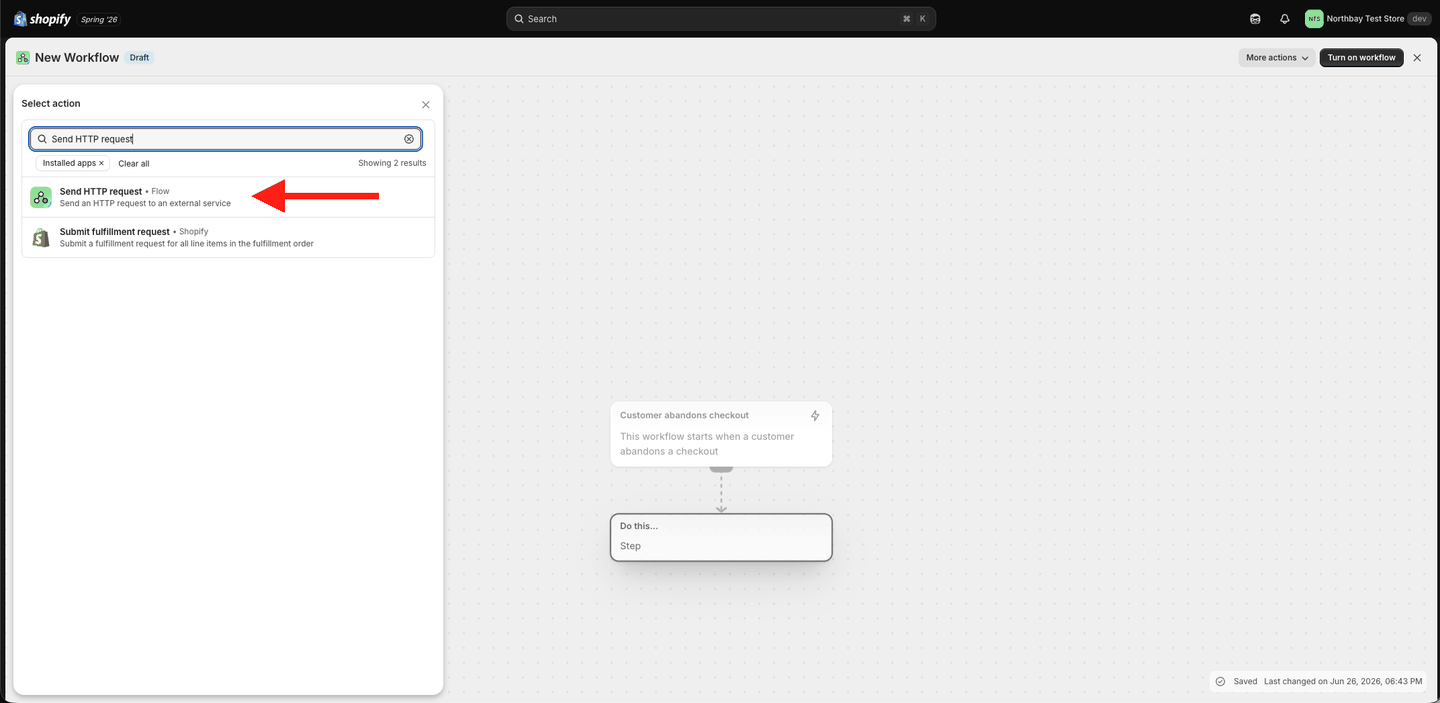
5. The request form opens empty.
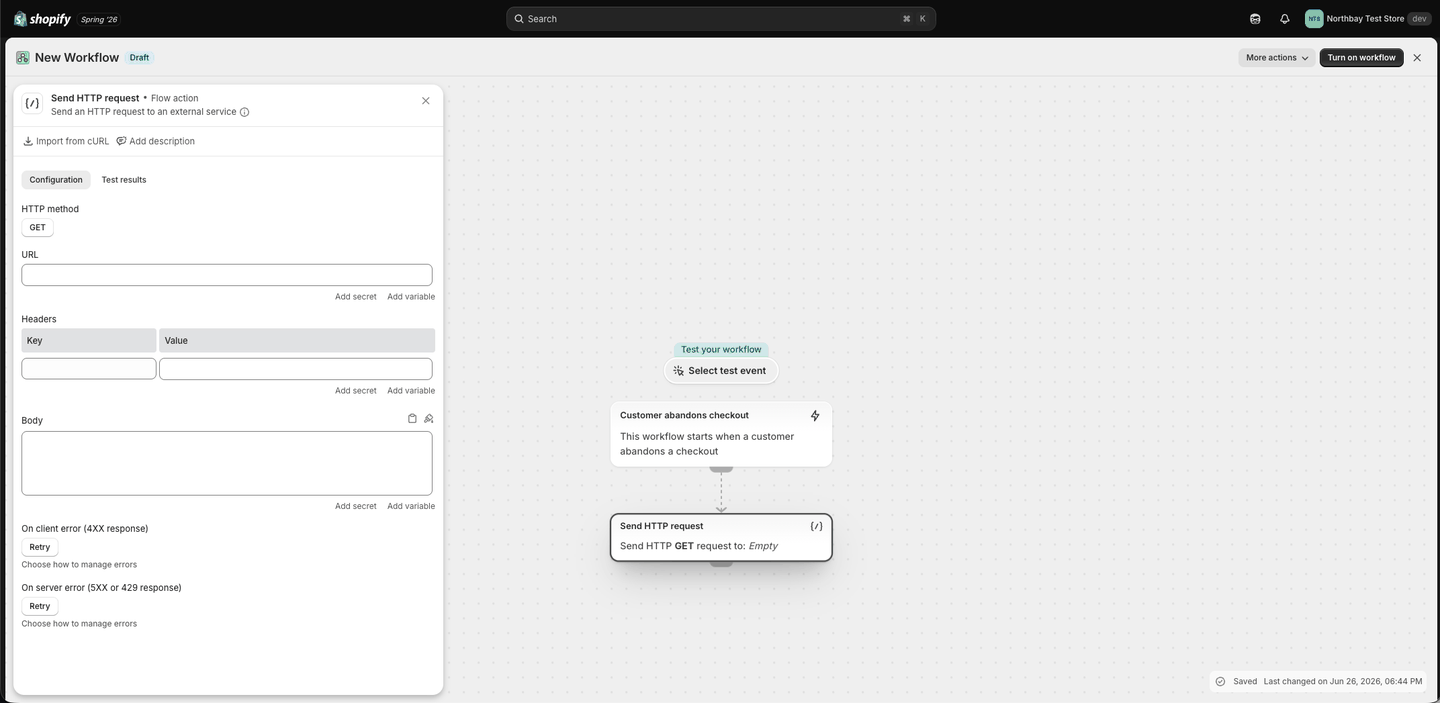
6. Fill in the request exactly as in the image below. Set each field:
- Method:
POST - URL: the webhook URL from your Wassenger flow (the Abandoned cart node you copied earlier)
- Header
Content-Type→application/json - Header
Token→ your Wassenger API key - Body: paste the block below, then use Flow's Add variable button to fill in each value (you don't need to read it — just match the field names):
{
  "event": "abandoned_checkout",
  "checkout": {
    "recovery_url": "{{ abandonedCheckout.abandonedCheckoutUrl }}",
    "total": "{{ abandonedCheckout.totalPriceSet.presentmentMoney.amount }}",
    "currency": "{{ abandonedCheckout.totalPriceSet.presentmentMoney.currencyCode }}"
  },
  "customer": {
    "first_name": "{{ abandonedCheckout.customer.firstName }}",
    "email": "{{ abandonedCheckout.customer.email }}",
    "phone": "{{ abandonedCheckout.customer.phone }}"
  },
  "line_items": [
    {% for lineItem in abandonedCheckout.lineItems %}
    { "title": "{{ lineItem.title }}", "quantity": {{ lineItem.quantity }} }{% unless forloop.last %},{% endunless %}
    {% endfor %}
  ]
}
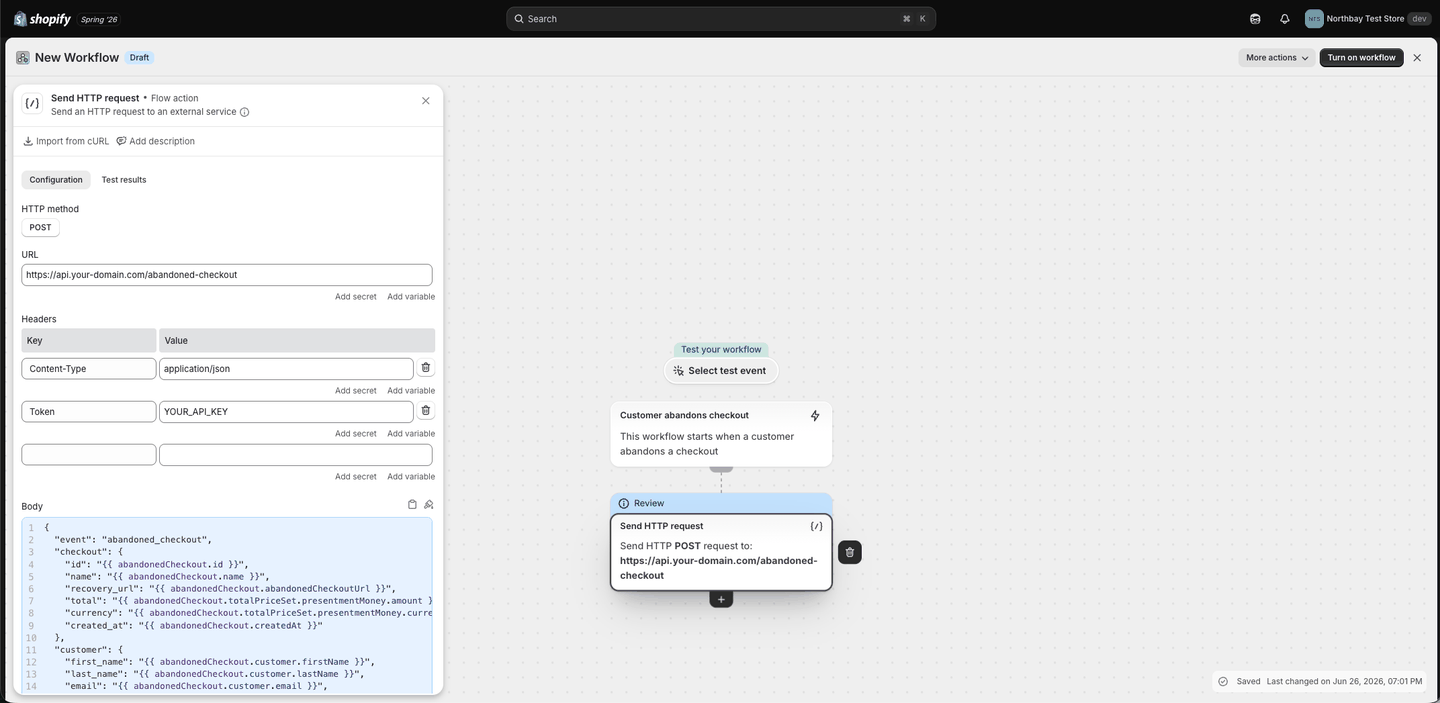
Note: Shopify's Send HTTP request action is available on the Grow plan or higher.
Step 6 · Turn it on
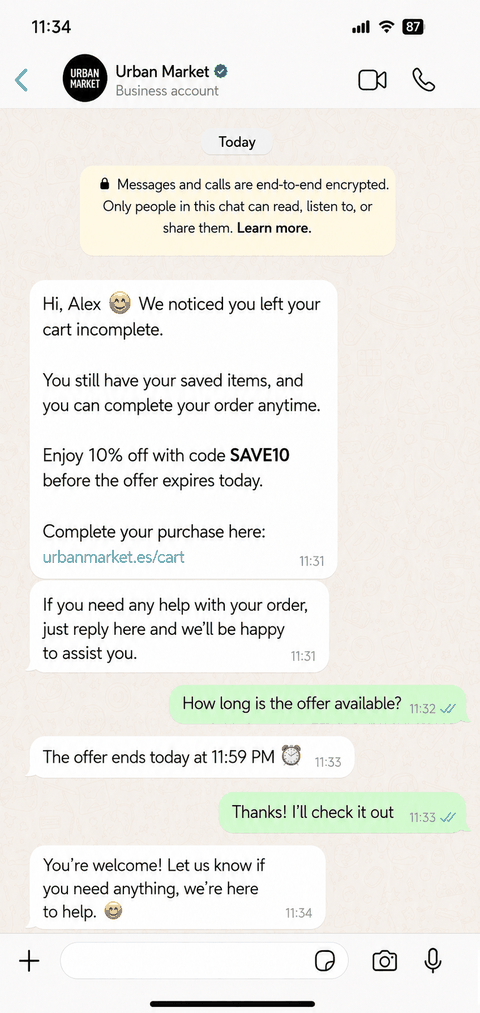
Click Turn on workflow. That's it — every abandoned cart now triggers an automatic WhatsApp reminder. Here's what your customer sees:
No Shopify store yet? Start a free Shopify trial — you can set up your store and test this whole flow before committing to a paid plan.
A gentle reminder sequence
One message recovers some carts; a short, respectful sequence recovers more — and it's already built into the flow above. Always stop the moment the customer buys or replies STOP.
| When | Message |
|---|---|
| 1 hour after | Friendly reminder + link back to checkout |
| 24 hours later | Follow-up + a small coupon |
Frequently asked questions
Do I need a plugin to detect abandoned carts?
No. Shopify tracks abandoned checkouts natively on every plan — you're simply adding WhatsApp on top.
Do I need to know how to code?
No. The whole setup is clicking through Shopify Flow and Wassenger.
Which plans do I need?
Wassenger Business plan or higher (for flows). On Shopify, the Send HTTP request step needs the Grow plan or higher.
What if the customer didn't leave a phone number?
Then WhatsApp can't reach them — Shopify only captures a phone if the customer typed one in. Those customers still get Shopify's own recovery email.
Resources
Ready to recover more sales?
Set this up once and it works while you sleep. Create your free Wassenger account and turn abandoned carts into completed orders.