
Run WhatsApp Business with a team that scales.
Shared inbox, AI replies, broadcast campaigns and no-code automations — built on the official WhatsApp Business API. Trusted by 5,000+ businesses worldwide. Live in 5 minutes.
Trusted by teams using the tools you already run on


What changes when your team has Wassenger.
Stop juggling phones and tabs. Run every customer conversation from one place — with AI on standby to handle the repetitive bits.
Reply faster
AI drafts the answer while you focus on the customers who actually need you. Stop typing the same reply 50 times a day.
Never miss a customer
Every WhatsApp message lands in one shared inbox. Assign, route and reply across a team of 3 to 50 — no agent left in the dark.
Send campaigns safely
Schedule broadcasts to opt-in lists with full delivery and read tracking. Pre-approved Meta templates, throttled to keep your number safe.
Everything you need to run WhatsApp at work.
Six core capabilities, one platform, one bill. Click any feature to see how it works in detail.
Shared team inbox
Assign, route and reply across one WhatsApp number. Internal notes, labels, quick replies, statuses — built so 3 to 50 agents can work the same number without stepping on each other.
Try the inboxAI Assistant powered by ChatGPT
Train on your docs, FAQs and product catalog. Claude or ChatGPT can draft conversation-aware replies, translate any language, summarize long threads and rewrite messages in your tone — all from inside the inbox.
AI Assistant detailsCampaigns at any scale
Send templated broadcasts to opt-in lists with throttling, segmentation, delivery + read tracking, and CSV export. Up to 100 campaigns per month and 2,000 recipients per campaign on Enterprise.
Campaigns detailsFlows — no-code automation
Visual drag-and-drop builder for replies, lead capture, qualification and handoffs. Triggers from messages, webhooks or schedules. 70+ ready-made templates, version history, test runs without sending real messages.
Flows detailsOpen API for custom integrations
Send messages, manage chats and sync contacts from your own apps. Official SDKs, webhooks with automatic retries — the same API that powers our console. For developers who need it; optional for everyone else.
API documentationiOS + Android mobile apps
Native mobile apps for agents on the move. Push notifications, voice notes, photo / video / document attachments. Same shared inbox, same labels, same flows — included on every plan.
Mobile app detailsOne WhatsApp number. Your whole team, in one inbox.
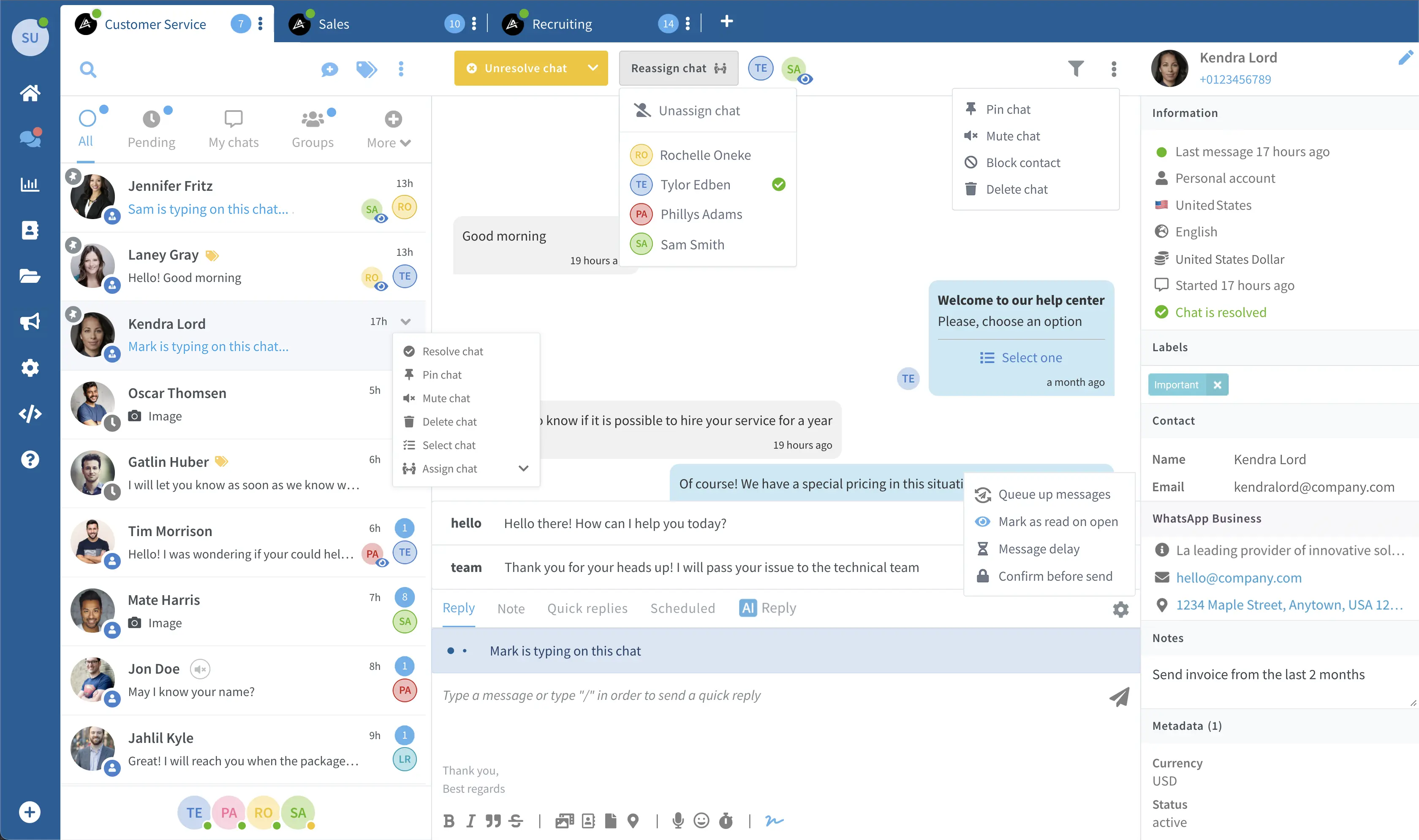
Right now, someone is answering a chat another agent already replied to, or nobody is. Team Inbox puts every conversation in one shared inbox: assign it, leave a private note, hand it off. Everyone sees who has which chat, and who is already in it. The customer just sees fast answers.
- Assign chats, or let whoever replies first take them. Everyone sees who has what.
- Private internal notes: context travels with the chat, not in someone's head.
- Quick replies, labels and statuses keep a busy inbox under control.
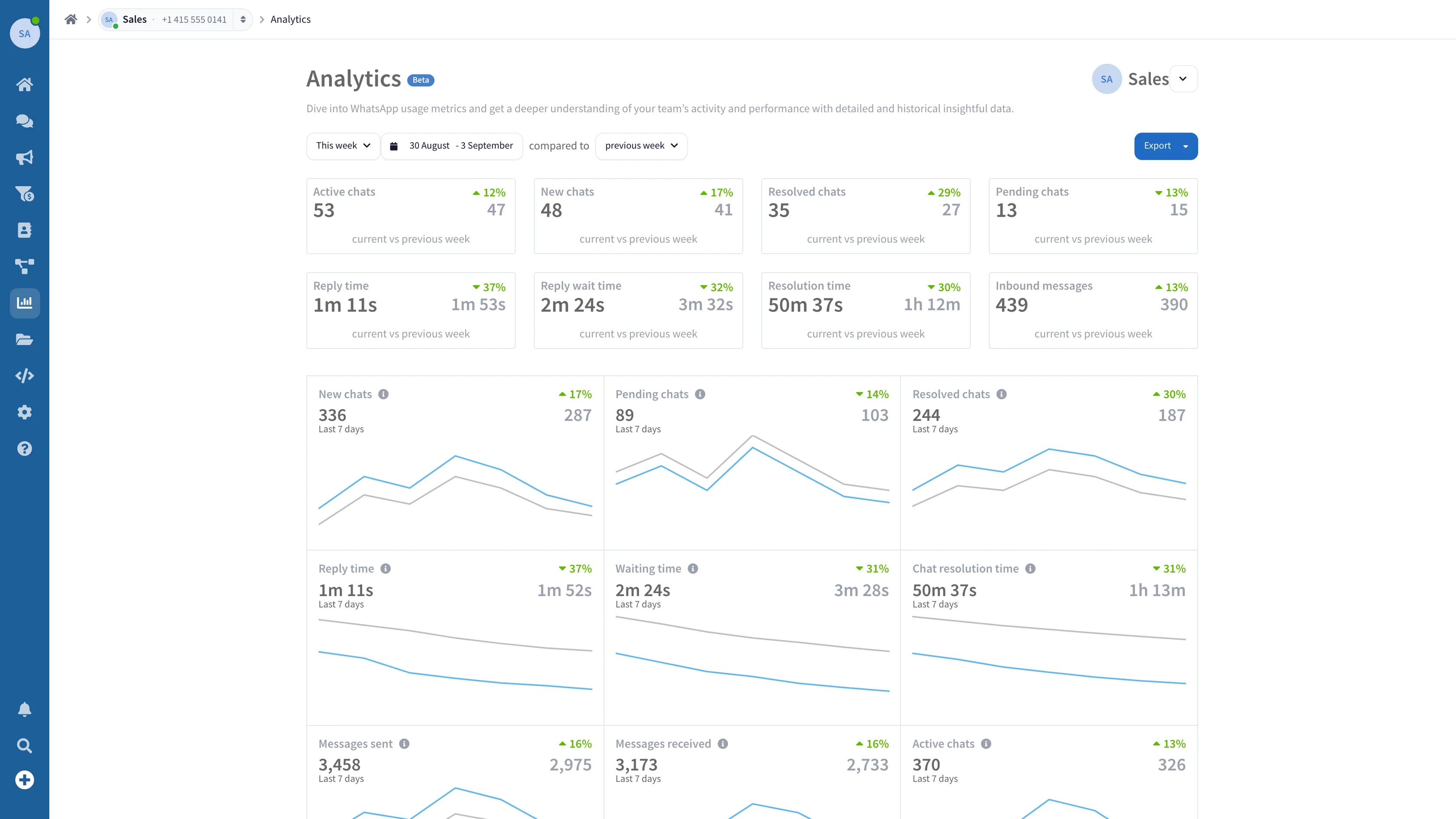
Run your inbox on numbers, not hunches.
How fast does your team really reply? Who is carrying the inbox? Analytics turns your WhatsApp conversations into numbers you can act on: new, pending and resolved chats, reply and resolution times, and the messages each agent sends, day by day. Walk into Monday's meeting with answers, not opinions.
- Reply and resolution times, for the whole team and for each agent.
- Compare any period with the one before it, from today to the last 12 months.
- Download the report as a PDF, an image or a CSV, for the meeting or the board.
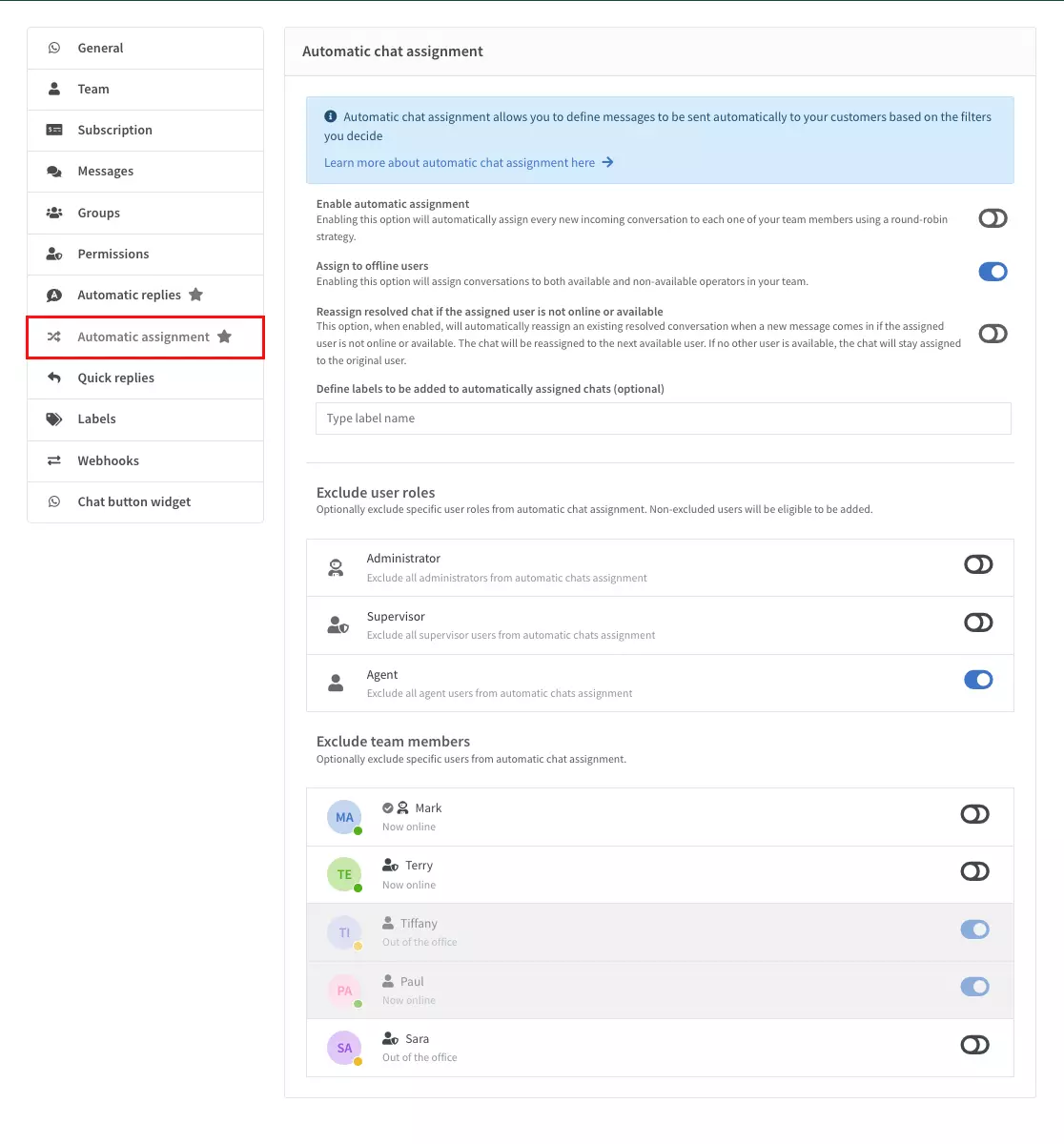
Every chat to the right team — before anyone has to ask.
A pricing question should not land in the support queue. Split your team into departments — Sales, Support, Billing, by language or region — and assign each conversation to the right one, or to the right person in it. Automatic assignment hands new chats to the agents who are available, and a Flow can send each one to its department by keyword, by topic or by office hours. Agents stop playing hot potato with chats that were never theirs.
- Group agents into departments — by function, language or region.
- Send each chat to the right department with a Flow — by keyword, topic or office hours.
- A “My departments” view shows each agent the chats assigned to their departments.
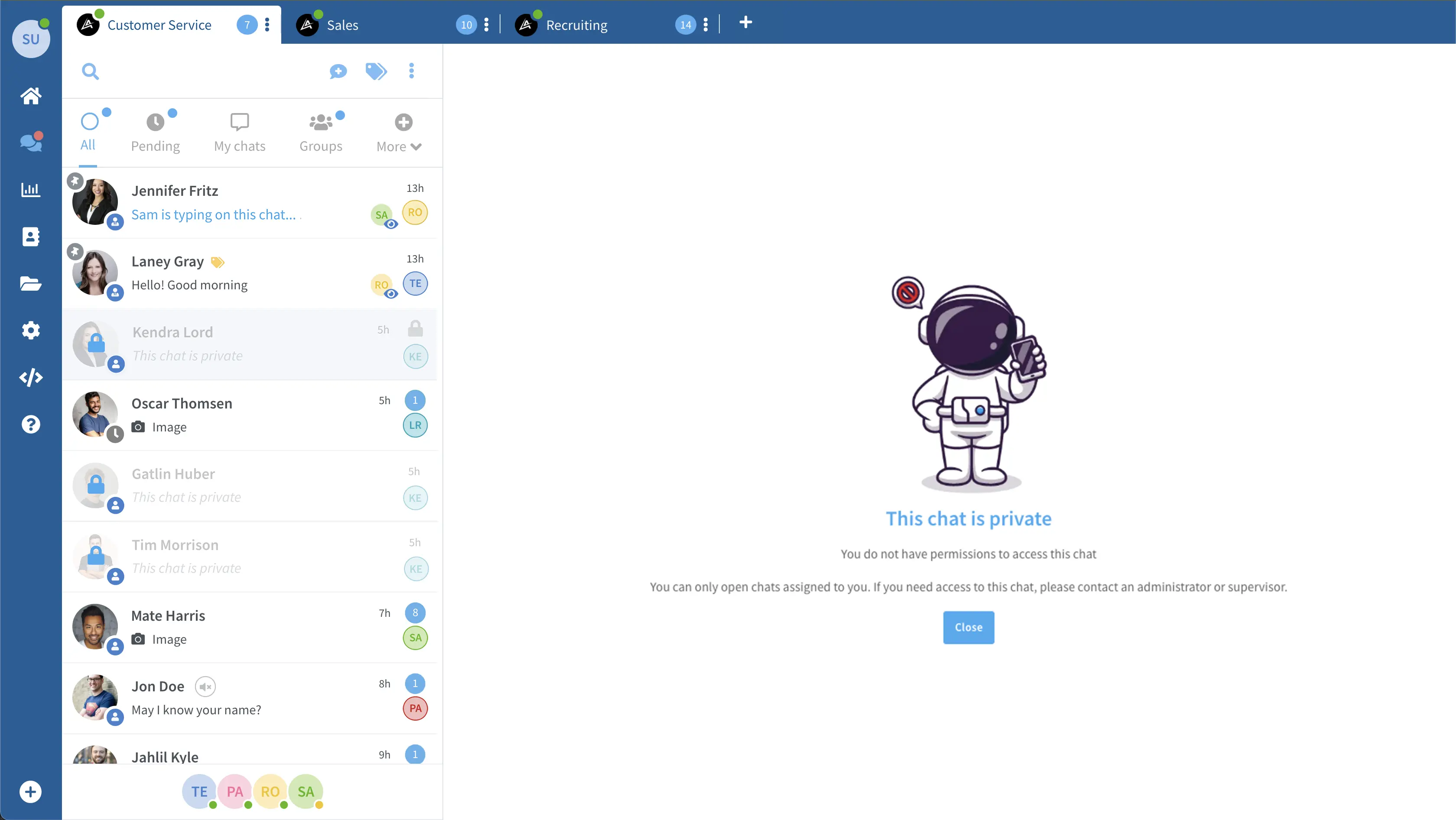
Not everyone needs to see everything.
A new hire should not be able to export your whole contact list on day one. With roles and permissions you decide who can read and reply to which chats, who can delete or export them, who sees your customers’ phone numbers and who can touch the settings. Set it once for each role, on each of your WhatsApp numbers. Bring on a freelancer without handing over the keys to everything.
- Add each person and give them a role: Admin, Supervisor or Agent.
- Choose who can start chats, and which chats each role can see, read and answer: all of them, new ones, a colleague’s or only their own.
- Lock down exports, settings and billing — replying is not the same as admin.
Stop typing the same reply forty times a day.
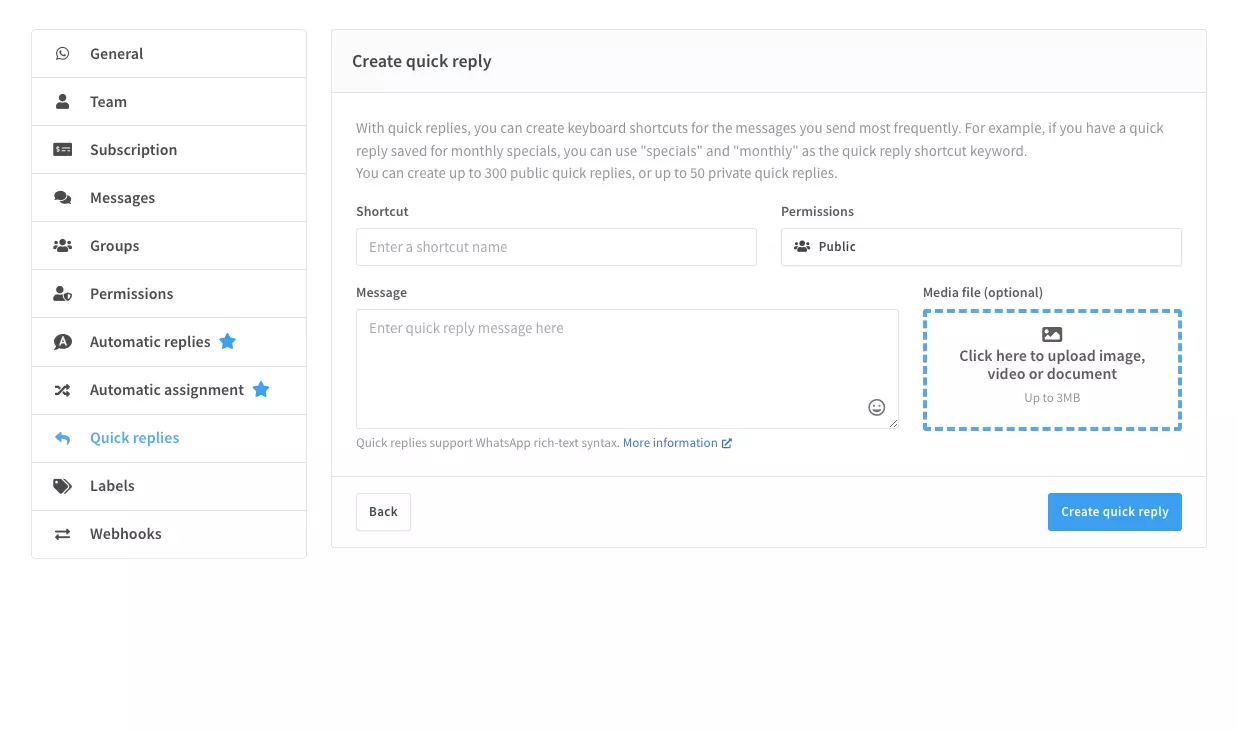
Shipping times. Opening hours. Return policy. Your team answers the same questions on repeat. Quick replies turn each one into a single keystroke. Labels keep a 200-chat inbox sortable. Internal notes hand the next agent full context — no forwarded screenshots, no guessing who picked up what. None of it is flashy. All of it gives your team their hours back.
- Quick replies — save any answer, drop it into a chat in one keystroke.
- Labels and tags keep a busy inbox sorted and instantly searchable.
- Internal notes pass context between agents — privately, inside the chat.
Plug Claude, ChatGPT or any AI straight into WhatsApp.
Connect your favorite AI assistant to your live WhatsApp number in two clicks. Read your inbox, draft replies and trigger automations — straight from Claude Desktop, ChatGPT or Cursor. No code required.




Less hidden, more shipped.
Five reasons teams switch from generic WhatsApp tools to Wassenger.
Pass-through Meta pricing
We charge for the platform. Meta charges per conversation — we don't add a markup on top.
AI & mobile included
AI Assistant and native iOS + Android apps from $39.90/mo — not an upsell on the highest tier.
5-minute setup
Official WhatsApp Business API, guided onboarding. Connect your number, send your first message.
7-day free trial
No credit card. Cancel anytime from your account. Read-only access stays even after the trial ends.
5 languages, EU-hosted
English, Spanish, Portuguese, French, Italian. Workspace-level controls, EU data residency.
Try Wassenger free for 7 days.
Bring your WhatsApp Business number, connect in about 5 minutes, and go live. Trusted by 5,000+ businesses worldwide.