
Skip to content

Every customer gets an answer.Even when you’re closed.

Wassenger replies for you when a customer writes in, after hours, while your team is busy, when a chat goes quiet and when you miss a call. In your words, on your hours.

  • 7 days free
  • No card · cancel anytime
Pick a moment to see the reply your customer gets.
Welcome messageWhen a customer writes to you
Message

Hi {{contact.name}}! Thanks for writing to Northbay. Someone from the team will reply in a few minutes.

Rules
  • Everyone
  • Once every 14 days
On every plan
Away messageWhen someone writes while you’re closed
Message

Thanks {{contact.name}}! We’re closed right now. We open tomorrow at 9:00 and will answer you first thing.

Rules
  • Mon to Fri, 9:00 to 18:00
  • Special dates
On every plan
Busy messageWhen nobody has replied in 10 minutes
Message

Sorry for the wait, {{contact.name}}. The team is with other customers and will be with you shortly.

Rules
  • After 10 minutes
  • New contacts
Business and Enterprise
Follow-up messageWhen a chat has gone quiet
Message

Hi {{contact.name}}, did you have a chance to look at the quote? Reply here and we’ll get it moving.

Rules
  • After 24 hours
  • Only chats labelled Quote
Business and Enterprise
Missed call messageWhen you miss a WhatsApp call
Message

Sorry we missed your call, {{contact.name}}. Write to us here and we’ll answer right away.

Rules
  • Reject the call too

On numbers connected with a QR code

Business and Enterprise
  1. Hi! Do you ship to Canada?
  2. Hi Ryan! Thanks for writing to Northbay. Someone from the team will reply in a few minutes.
  1. Are you open tomorrow?
  2. Thanks Ryan! We’re closed right now. We open tomorrow at 9:00 and will answer you first thing.
  1. Hello, I need to change my order
  2. Sorry for the wait, Ryan. The team is with other customers and will be with you shortly.
  1. Can you send me a quote for 40 bottles?
  2. Here it is: 40 bottles with your logo, 12% off.
  3. Hi Ryan, did you have a chance to look at the quote? Reply here and we’ll get it moving.
  1. Missed voice call
  2. Sorry we missed your call, Ryan. Write to us here and we’ll answer right away.

Your hours end. Your customers’ questions don’t.

Messages arrive while you’re with someone else, before you open and after you close. A customer who hears nothing writes to the next business. Each reply covers one of those moments.

  1. Before opening: the away message says when you open.
  2. A new customer: the welcome message says hello.
  3. Ten minutes with no reply: the busy message.
  4. A missed call: a message to write instead.
  5. A quote with no answer since yesterday: the follow-up.
  6. After closing: the away message again.

Helpful, never pushy.

Automatic replies know when to stay quiet, so customers hear from you at the right moment, and not three times in a row.

Says hello once

The welcome message goes out once in the period you choose, from 24 hours to 2 months, not on every message.

Steps aside for your team

If someone from your team wrote in the chat in the last 30 minutes, no automatic reply goes out.

Your hours, your time zone

Opening hours for each day, two ranges if you close for lunch, holidays that repeat every year, or the hours from your WhatsApp Business profile.

In your words, with their name

Write each reply the way you talk, with the customer’s name filled in, and add an image like a menu or a price list.

Only to the right people

Send them to everyone, or only to people who aren’t in your contacts yet. Leave out resolved or assigned chats and up to 100 numbers.

Easy to pick up from

Every automatic reply is marked in the chat. Find those chats under Auto replied in the inbox, or label them as they go out.

Set it up once. It answers from then on.

Each reply is a card in your WhatsApp number’s settings. Switch it on, write it, and choose who gets it.
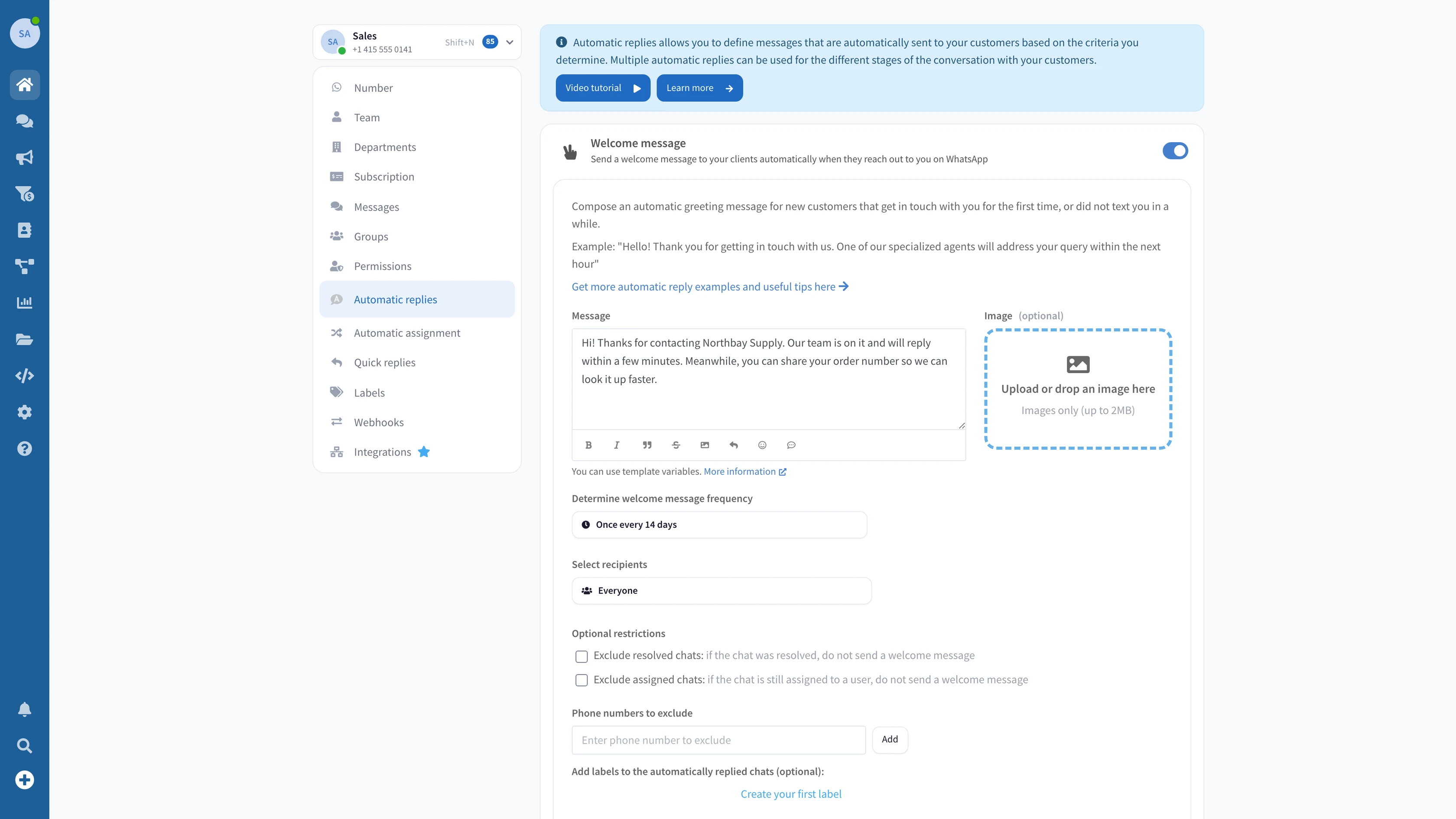
  1. 1Open Automatic repliesIn your WhatsApp number’s settings, open Automatic replies. Each of the five has its own card.
  2. 2Switch one onStart with the welcome message, or the away message with your opening hours.
  3. 3Write it in your wordsUse the customer’s name and add an image if it helps, like a menu or a price list.
  4. 4Choose who gets it, and how oftenEveryone or only new contacts, once every few days, and the chats to leave out.
The Automatic replies settings in Wassenger, with the welcome message switched on, its text, how often it is sent and who gets it

On every plan, from Professional.

How many customers write after hours and never hear back? The welcome and away messages come with every plan. Business adds the busy, follow-up and missed-call replies.

  • Welcome and away messages
  • Business hours, time zone and special dates
  • The customer’s name, an image and labels in every reply
  • Business, $69.90 a month: busy, follow-up and missed-call replies
Professional

From$39.90/month

With 3 agents, the shared inbox and quick replies

  • 7 days free
  • No card · cancel anytime

Frequently Asked Questions

Plans, hours, who gets the replies and what automatic replies do and don’t do.

Which plans include automatic replies?
The welcome and away messages come with every plan, from Professional at $39.90 a month. The busy, follow-up and missed-call replies come with Business at $69.90 a month and with Enterprise. Every plan starts with a 7-day free trial, no credit card needed.
Can it reply based on what the customer writes?
No. Automatic replies answer moments, not words: a first message, closed hours, a wait, a quiet chat or a missed call. To answer based on what the customer writes, use a Flow or the AI Assistant.
Will customers get a reply to every message?
No. The welcome message goes out once in the period you choose, from 24 hours to 2 months. No automatic reply is sent if your team wrote in the chat in the last 30 minutes, and replies are spaced out so nobody gets several in a row.
How do I set my business hours?
In the away message, set each day as open all day, closed, or open for up to two time ranges, in your time zone. Add up to 20 special dates, like holidays, that repeat every year, or copy the hours from your WhatsApp Business profile.
Who gets the replies?
Everyone, or only people who are not in your contacts yet. You can leave out resolved or assigned chats and up to 100 phone numbers, and send away and follow-up messages only to chats with certain labels.
Does it work in WhatsApp groups?
No. Automatic replies are sent in one-to-one chats with your customers.
Does it work with the WhatsApp Business API?
Yes, with two differences. WhatsApp only lets businesses reply within 24 hours of the customer’s last message, so a reply due later is not sent. The missed-call reply needs a number connected with a QR code.
Do I need to keep my phone on?
No. The replies are sent by Wassenger, not by your phone, as long as your number stays connected to Wassenger.
Will my team know a reply was sent?
Yes. Automatic replies are marked in the chat, the inbox has an Auto replied filter, and you can add labels to every chat that got one.

Let your number answer while you can’t.

Tonight’s messages can already get a reply. Switch on your first automatic reply in a few minutes.