
Skip to content

One WhatsApp number.Your whole team on it.

Every chat lands in one shared inbox. Your team assigns it, passes it on and leaves notes for each other. The customer just gets quick answers.

  • 7 days free
  • No card · cancel anytime
Switch sides to see what your customer sees.
RCRyan ColeAssigned toMarco BianchiSAMB
NorthbayWhat Ryan sees on WhatsApp
  1. Hi! Do you sell the insulated steel bottles in bulk?
  2. Sofia took the chat
  3. SASofiaHi Ryan, yes we do! How many do you need?Sofia, Customer care
  4. Around 40, with our logo on them.
  5. Note from SofiaOnly your team sees this@Marco can you quote 40 bottles with a logo?
  6. Sofia passed the chat to Marco
  7. MBMarcoHi Ryan, Marco from sales. 40 with your logo: 12% off, ready in 10 days.Marco, Sales
  8. Perfect, let’s do it.

A shared phone loses customers. A shared inbox keeps them.

When the team passes one phone around, nobody knows who answered, what was promised or who is still waiting. The customer notices first.

One phone, passed aroundOne inbox, the whole team
  • Two people answer the same customer, or nobody does.

    Every chat has one owner, and the whole team can see who it is.

  • Chats wait on the phone of whoever is off today.

    Everyone signs in from their own computer or phone, on the same number, at the same time.

  • What was promised lives in someone’s head.

    Private notes keep the context inside the chat, for your team only.

  • Nobody knows which customers are still waiting.

    Filters show who has no reply yet and who has waited longest.

  • Customers get answers from “the phone”, with no name.

    Each person can sign their replies, so customers know who is helping.

See who is still waiting. In one click.

A chat nobody owns, or nobody has answered, is a customer about to give up. Filters bring those chats to the top before they do.

  • Mine, a colleague’s, unassigned, or once yours
  • Not replied, longest waiting, new today, unread
  • By label, by department, auto-assigned
  • Search by name, phone, email or note

Save the lists you use most: 5 on Business, 10 on Enterprise.

ChatsSASigned in as Sofia
  1. NBNina BergIs the blue jacket back in stock?42 minUnassigned
  2. OHOmar HaddadCan I get a quote for 40 units?27 minPN
  3. LSLucas SilvaCould we schedule a call?18 minUnassigned
  4. RCRyan ColeReady in 10 days, I’ll send the invoice.MB
  5. AOAmara OkaforHi, I need to change my delivery address6 minUnassigned
  6. HSHana SatoDo you deliver on Saturdays?3 minSA
  7. ERElena RossiYou’re welcome, have a great day!SA

Everything the team needs, inside the chat.

Notes, mentions, quick replies and the full history, so whoever picks up a chat knows exactly where it stands.

Private notes and @mentions

Leave a note inside the chat that only your team sees. Mention a teammate and they get notified.

See who is on it

See who has a chat open and who is typing, so two people don’t answer the same customer.

Quick replies

Type / to drop in a saved answer, with the customer’s name filled in. Share them with the team or keep your own.

Replies with a name

Each person can sign their messages, on every reply or only the first one, so customers know who is helping.

Labels, and done is done

Tag chats to find them later, and resolve them when they’re finished, so the open list only holds work still to do.

The whole story of every chat

Every assignment and hand-off is recorded in the chat, so anyone can pick it up without asking around.

Your team on one number this afternoon.

No phones to hand around and no software to install. Your team works in the browser, on the same inbox.
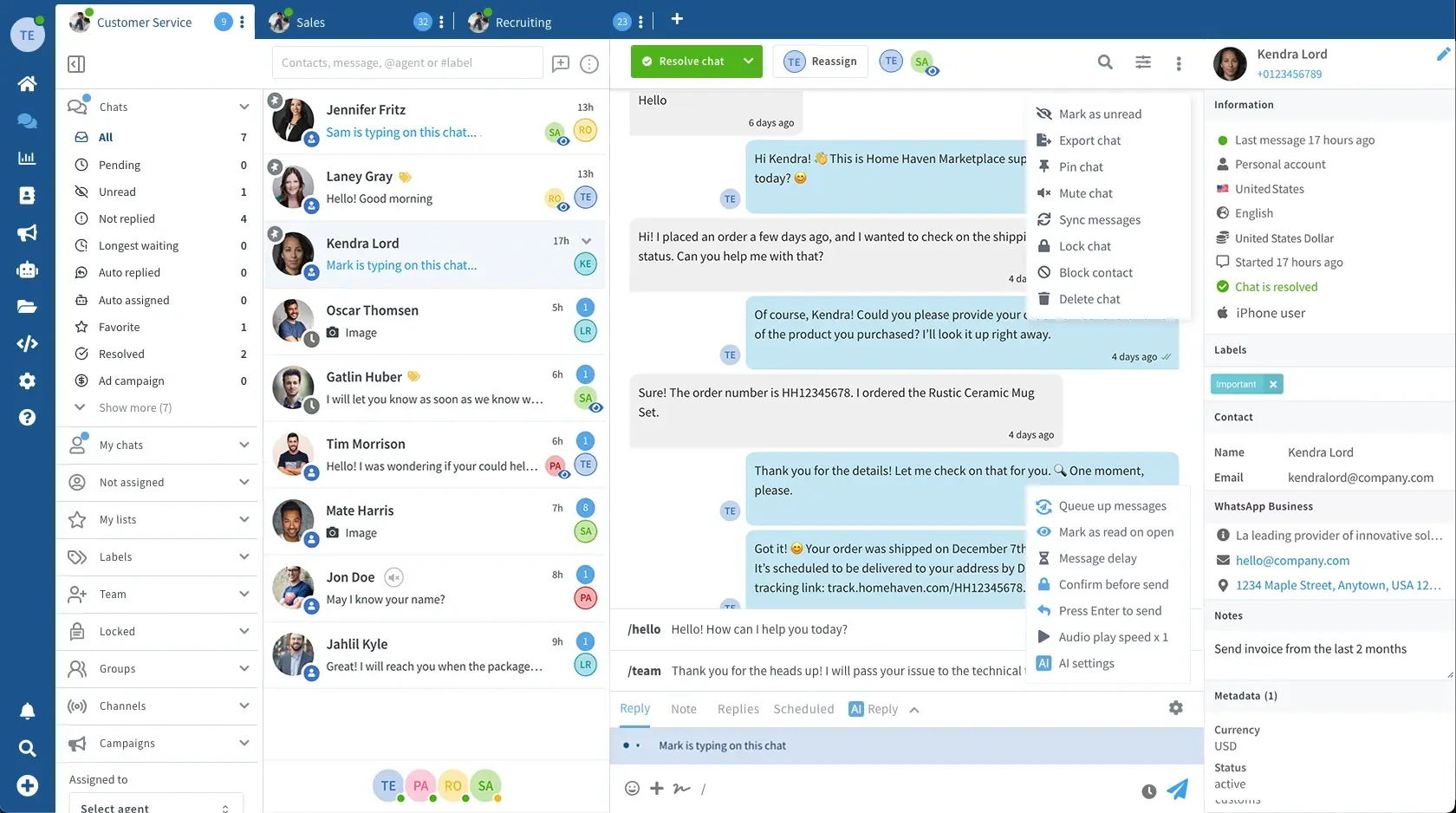
  1. 1Connect your numberLink your WhatsApp number with a QR code, or connect the WhatsApp Business API. Each number gets its own inbox.
  2. 2Invite your teamAdd each person by email. They sign in from their own computer or phone, on the same number.
  3. 3Pick a queueOpen Unassigned or Not replied and take the next chat, or assign it to someone.
  4. 4Reply, or write to your teamAnswer the customer in Reply. Leave a private note for your team in Note.
The Wassenger inbox: filters on the left, the chats of the team, and an open conversation with Reply and Note

Start with three people. Grow from there.

The shared inbox is on every plan. Bigger plans add seats and the tools a bigger team needs.

  1. Professional

    3 agents

    $39.90/month

    • The shared inbox on your number
    • Assign chats, notes and @mentions
    • Quick replies, labels and signatures
  2. Business

    6 agents

    $69.90/month

  3. Enterprise

    9 agents, and more when you need them

    $99.90/month

    • Everything in Business
    • Up to 10 departments
    • More agents for $14 a month each
Try it freeCompare plans

7 days free on every plan. No card, cancel anytime.

Frequently Asked Questions

Seats, privacy, phones and what the shared inbox does and doesn’t do.

How many people can use one WhatsApp number?
Professional includes 3 agents, Business 6 and Enterprise 9, and on Enterprise you can add more for $14 a month each. Everyone works on the same number at the same time.
Do my customers see who is answering?
They see one conversation with your business. Assignments, notes and hand-offs stay inside Wassenger. If an agent signs their messages, the customer sees the signature.
Can two people reply to the same chat by mistake?
Each chat shows who owns it, who has it open and who is typing, so the team can see it coming. Chats are not locked. On Enterprise, team permissions can let agents reply only to the chats assigned to them.
Are notes really private?
Yes. Notes are saved in Wassenger and never sent to WhatsApp. Only your team sees them. Mention a teammate with @ and they get notified.
Do I need the WhatsApp Business API?
No. You can connect a WhatsApp or WhatsApp Business number with a QR code, or connect the WhatsApp Business API.
Can my team answer from their phones?
Yes. Wassenger works in any browser, including on a phone, and there is an Android app. New and assigned chats can notify each person on desktop, on mobile and by email.
What happens to the chats of someone who is off?
They stay in the shared inbox for anyone to pick up. Filter by Unassigned or Not replied, or pass them on in one click. On Business and Enterprise, automatic assignment can move them to someone who is online.
Can I limit what each person sees?
On Enterprise. Team permissions decide which chats each role can read and answer, who sees phone numbers and who can export or delete.
Is there a free trial?
Yes. Every plan starts with 7 days free, no credit card needed.

Answer every customer as one team.

Every chat your team doesn’t see is a customer deciding whether to wait. Bring everyone onto your number today.