
See, read and reply
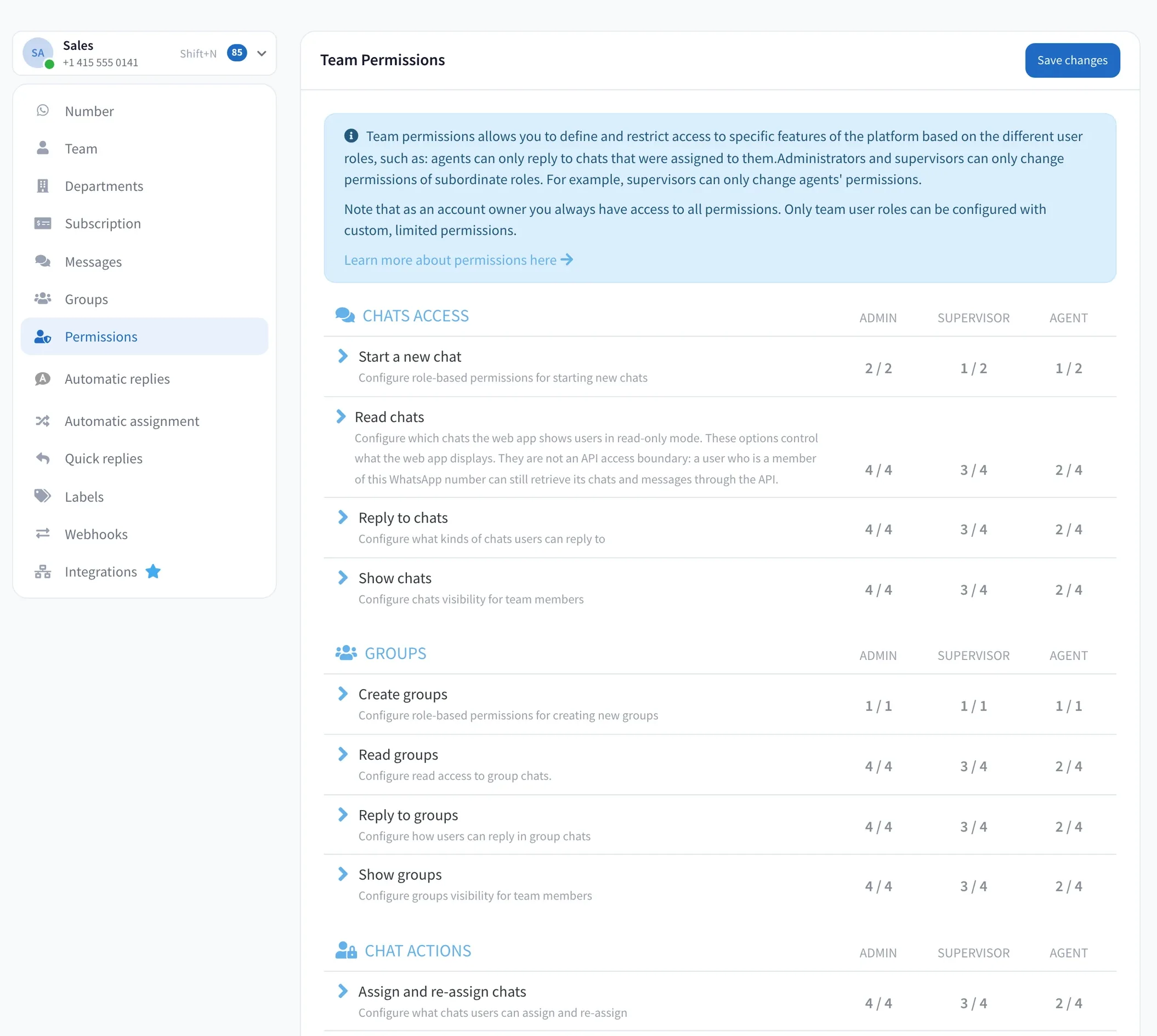
Choose who can start chats, and which chats each role can see, read and answer: all of them, new ones, a colleague’s or only their own.
Decide who can read, reply, assign or delete each WhatsApp chat, and who sees your customers’ phone numbers.
Link a WhatsApp number to more phones, or share its login, and everyone gets the same access: every chat, every customer’s number, every delete button.
Wassenger adds the missing piece: one rule for each of these.
A temp tidying up the inbox deletes a three-month thread with your biggest customer.
Delete chats: Admins onlyTwo agents answer the same customer a minute apart, with two different prices.
Reply: only chats assigned to themA new hire edits the auto-reply. For two days, every customer gets a typo.
Auto-replies: Admins and SupervisorsAn intern scrolls through VIP complaints, phone numbers and all.
Phone numbers: hidden from AgentsA salesperson who just resigned exports their chats with your best accounts.
Export chats: off for AgentsPick an action, then the chats it applies to. Four kinds of chats cover every case, and you can combine them.
Each role gets its own answer for every action, on every WhatsApp number.
Each role gets its own setting for everything below. Start from sensible defaults and change only what your team needs.
Choose who can start chats, and which chats each role can see, read and answer: all of them, new ones, a colleague’s or only their own.
Let people view or edit a contact only when it’s their customer, and hide phone numbers from anyone who doesn’t need them.
Every action that changes a conversation has its own rule, so one click can’t undo your team’s work.
The same rules for WhatsApp groups: who creates them, and who sees, reads and replies.
Keep auto-replies, templates, labels, webhooks, departments and billing with the people in charge, and decide who can connect, disconnect or reboot the number.
Choose who can answer and make calls, and whose call history they see.
Everyone on your team has a role, and every role has its rules. Departments and auto-assignment route each chat to the right person; permissions keep everyone else to what you allow.
Admins and Supervisors can only change the rules of the roles below them.
Departments come with the Business and Enterprise plans. Permissions come with Enterprise.
Eight common setups, from customer support to travel. Use one as it is, or as the starting point for yours.
Ten agents share one number. Customers send order details, addresses and complaints, and anyone could read, export or delete any of it.
Every customer talks to one agent, and their details stay with the people who need them.
| Action | Admin | Supervisor | Agent |
|---|---|---|---|
| Read and reply | All | All | Own + new |
| See phone numbers | All | All | Off |
| Reassign chats | All | All | Own |
| Delete and export | All | Off | Off |
Reception books appointments, nurses answer follow-ups, and patients share symptoms and test results in the same chat.
A patient’s messages are seen by the people looking after them, not by the whole front desk.
| Action | Admin | Supervisor | Agent |
|---|---|---|---|
| Read and reply | All | Own | Own + new |
| See phone numbers | All | Own | Off |
| Send files | All | Own | Own |
| Delete and export | All | Off | Off |
Each lawyer has their own clients, and a case read by the wrong colleague is a real problem.
Client conversations stay between the client and their lawyer.
| Action | Admin | Supervisor | Agent |
|---|---|---|---|
| Read and reply | All | Own | Own |
| Reassign chats | All | Own | Off |
| See phone numbers | All | Own | Own |
| Export chats | All | Off | Off |
Advisors discuss policies, claims and account details on WhatsApp, often with documents attached.
Each client’s documents and details stay with their advisor and the managers above them.
| Action | Admin | Supervisor | Agent |
|---|---|---|---|
| Read and reply | All | All | Own |
| Send files | All | All | Own |
| See phone numbers | All | All | Own |
| Delete chats | All | Off | Off |
Leads arrive from listings all day. Agents race for the good ones, and buyers’ numbers leave with whoever leaves.
Leads are shared fairly, and your contact list stays your agency’s.
| Action | Admin | Supervisor | Agent |
|---|---|---|---|
| Read and reply | All | All | Own |
| Reassign chats | All | All | Off |
| See phone numbers | All | All | Own |
| Export chats | All | Off | Off |
Hundreds of order questions a day, seasonal staff, and customers sharing addresses and order numbers.
Temporary staff help from day one without seeing your whole customer base.
| Action | Admin | Supervisor | Agent |
|---|---|---|---|
| Read and reply | All | All | Own + new |
| Resolve chats | All | All | Own |
| See phone numbers | All | All | Off |
| Delete, block and export | All | Off | Off |
Dispatch, drivers’ coordinators and customer service share a number full of addresses, locations and delivery photos.
Each delivery has one person in charge, and customer addresses aren’t passed around.
| Action | Admin | Supervisor | Agent |
|---|---|---|---|
| Read and reply | All | All | Own |
| Send locations and photos | All | All | Own |
| Share contacts | All | All | Off |
| Reassign chats | All | All | Off |
Bookings, passports and itineraries go back and forth, often in a group chat with the whole family.
Travelers’ documents stay in the booking they belong to.
| Action | Admin | Supervisor | Agent |
|---|---|---|---|
| Read and reply | All | All | Own |
| Send documents | All | All | Own |
| Reply in groups | All | All | Own |
| Export chats | All | Off | Off |
Everything happens in your WhatsApp number’s settings, and you can change it again at any time.
What does one deleted thread, or one exported customer list, cost your business? Team permissions come with Enterprise, with everything in Business: departments, auto-assignment, Flows and more.
Plans, roles, groups, and what permissions do and don’t do.
Give every agent exactly the access they need, and keep your customers’ conversations and details in the right hands.