WhatsApp Status (similar to Instagram stories) is a powerful tool for businesses to engage customers, promote products, and share important updates. But updating it manually every day? That’s time-consuming! 🚀
What if you could automate WhatsApp Status updates without lifting a finger? With Wassenger API, businesses can keep their status fresh and engaging 24/7.
In this guide, we’ll show you how to automate WhatsApp Status updates, why it’s essential for businesses, and how Wassenger can make the process seamless.
🔗 Start automating now! 🚀 Sign up for Wassenger and supercharge your WhatsApp messaging with easy automation, detailed API documentation, and 24/7 support. Don’t miss out on scaling your business with seamless WhatsApp integration — Get Started Here!
Why Automate WhatsApp Status? 🤔
Keeping your WhatsApp Status updated ensures:
✅ Better Customer Engagement — Share promotions, news, and updates instantly.
✅ Consistent Brand Presence — Keep your business visible at all times.
✅ Time Efficiency — Save hours by scheduling status updates in advance.
✅ Hands-Free Automation — No need to manually change your status every day.
✅ Targeted Messaging — Use scheduled updates to engage your audience at the right time.
With Wassenger, businesses can schedule and automate WhatsApp Status updates. Try it now for free here 🚀
How to Set Up Automatic WhatsApp Status Updates
Prepare the request
Target API URL using the POST method
https://api.wassenger.com/v1/chat/{deviceId}/status
Required HTTPS headers > Obtain your API key here
Content-Type: application/json
Token: $API_TOKEN
Structure Your Request Correctly — Format your request with text, images, or videos depending on the status update type.
Want to automate your WhatsApp Status? Sign up for Wassenger now! 🚀
Code Examples: Automate WhatsApp Status Updates 💻
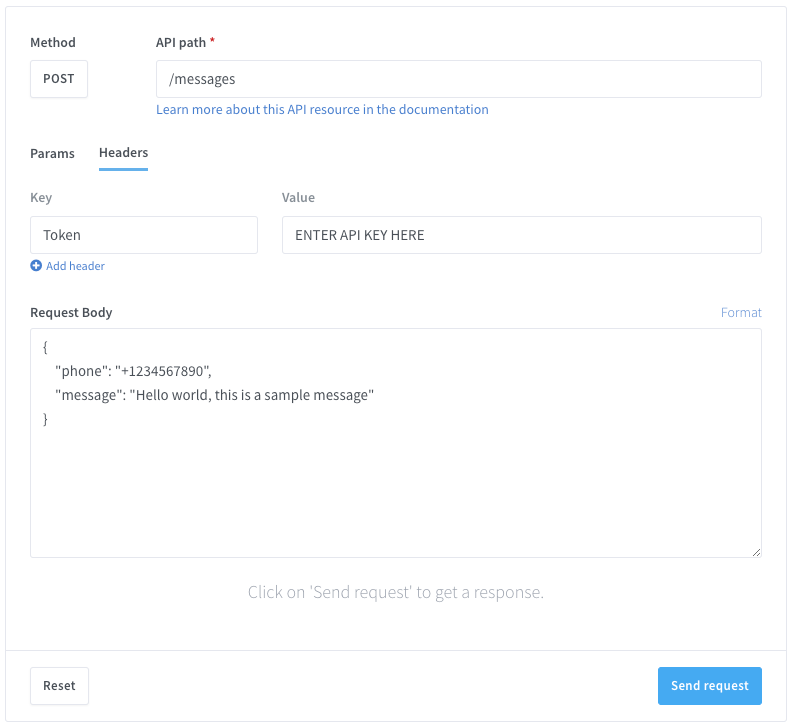
Use the Wassenger API Tester to validate your requests before deploying them
- Update Status with Text
{
  "message": "We have a new offer! Check out our latest products at www.mystore.com",
  "color": "blue",
  "font": "helvetica"
}
- Schedule a Status Update with an Image
{
  "message": "Check out our new arrivals!",
  "media": {
    "url": "https://picsum.photos/seed/picsum/600/400"
  },
  "schedule": {
    "date": "2025-02-03T20:48:27.264Z"
  }
}
- Schedule a Video Status Update
{
  "message": "Watch our latest promo!",
  "media": {
    "url": "https://download.samplelib.com/mp4/sample-5s.mp4"
  },
  "schedule": {
    "delayTo": "8h"
  }
}
Code Examples: Automate WhatsApp Status Updates 💻
Use the Wassenger API Tester to validate your requests before deploying them
C# (HttpClient) (Image status)
// This code uses the built-in HttpClient package in the.NET framework.
// Documentation: https://docs.microsoft.com/en-us/dotnet/api/system.net.http.httpclient?view=net-6.0
using System.Net.Http.Headers;
var client = new HttpClient();
var request = new HttpRequestMessage
{
Method = HttpMethod.Post,
RequestUri = new Uri("https://api.wassenger.com/v1/chat/%7Bdevice_id%7D/status"),
Headers =
{
{ "Token", "API KEY GOES HERE" },
},
Content = new StringContent("{\"message\":\"This is a image caption message that can also include links: https://youtube.com\", \"media\":{\"url\":\"https://picsum.photos/seed/picsum/600/400\"}}")
{
Headers =
{
ContentType = new MediaTypeHeaderValue("application/json")
}
}
};
using(var response = await client.SendAsync(request))
{
response.EnsureSuccessStatusCode();
var body = await response.Content.ReadAsStringAsync();
Console.WriteLine(body);
}
C# (RestClient) (Image status)
// This code requires you to have installed RestSharp package.
// Documentation: https://restsharp.dev
// Installation: https://www.nuget.org/packages/RestSharp
var client = new RestClient("https://api.wassenger.com/v1/chat/%7Bdevice_id%7D/status");
var request = new RestRequest(Method.POST);
request.AddHeader("Content-Type", "application/json");
request.AddHeader("Token", "API KEY GOES HERE");
request.AddParameter("application/json", "{\"message\":\"This is a image caption message that can also include links: https://youtube.com\", \"media\":{\"url\":\"https://picsum.photos/seed/picsum/600/400\"}}", ParameterType.RequestBody);
IRestResponse response = client.Execute(request);
Java (Image status)
// This code requires you to have installed Unirest package.
// Documentation: https://kong.github.io/unirest-java/#requests
// Installation: http://kong.github.io/unirest-java/
HttpResponse<String> response = Unirest.post("https://api.wassenger.com/v1/chat/%7Bdevice_id%7D/status")
.header("Content-Type", "application/json")
.header("Token", "API KEY GOES HERE")
.body("{\"message\":\"This is a image caption message that can also include links: https://youtube.com\", \"media\":{\"url\":\"https://picsum.photos/seed/picsum/600/400\"}}")
.asString();
Node.js (Axios) (Image status)
const axios = require('axios').default;
const options = {
  method: 'POST',
  url: 'https://api.wassenger.com/v1/chat/{device_id}/status',
  headers: { 'Content-Type': 'application/json', Token: 'API KEY GOES HERE' },
  data: {
    message:
      'This is a image caption message that can also include links: https://youtube.com',
    media: { url: 'https://picsum.photos/seed/picsum/600/400' }
  }
};
try {
  const { data } = await axios.request(options);
  console.log(data);
} catch (error) {
  console.error(error);
}
Python (Requests) (Image status)
# Examples requires to have installed requests Python package.
# Install it by running: pip install requests
import requests
url = "https://api.wassenger.com/v1/chat/%7Bdevice_id%7D/status"
payload = {
"message": "This is a image caption message that can also include links: https://youtube.com",
"media": { "url": "https://picsum.photos/seed/picsum/600/400" }
}
headers = {
"Content-Type": "application/json",
"Token": "API KEY GOES HERE"
}
response = requests.post(url, json=payload, headers=headers)
print(response.json())
Go (Image status)
package main
import(
"fmt"
"strings"
"net/http"
"io"
)
func main() {
url:= "https://api.wassenger.com/v1/chat/{device_id}/status"
payload:= strings.NewReader("{\"message\":\"This is a image caption message that can also include links: https://youtube.com\", \"media\":{\"url\":\"https://picsum.photos/seed/picsum/600/400\"}}")
req, _:= http.NewRequest("POST", url, payload)
req.Header.Add("Content-Type", "application/json")
req.Header.Add("Token", "API KEY GOES HERE")
res, _:= http.DefaultClient.Do(req)
defer res.Body.Close()
body, _:= io.ReadAll(res.Body)
fmt.Println(res)
fmt.Println(string(body))
}
Powershell (Image status)
$headers=@{}
$headers.Add("Content-Type", "application/json")
$headers.Add("Token", "API KEY GOES HERE")
$response = Invoke-WebRequest -Uri 'https://api.wassenger.com/v1/chat/{device_id}/status' -Method POST -Headers $headers -ContentType 'application/json' -Body '{"message":"This is a image caption message that can also include links: https://youtube.com", "media":{"url":"https://picsum.photos/seed/picsum/600/400"}}'
Live API testing
You can live-test and play with the API directly from your browser in minutes.
Once you are done testing, get the auto-generated code example in your preferred programming language and you will be ready to go.
Best Practices for WhatsApp Status Automation ✅
✔️ Keep it Engaging — Use visuals, offers, and updates that catch attention. ✔️ Stay Relevant — Post timely content that resonates with your audience. ✔️ Use Scheduling Wisely — Avoid spamming; plan updates strategically. ✔️ Monitor Performance — Analyze engagement and adjust accordingly. ✔️ Leverage Automation — Let Wassenger do the heavy lifting while you focus on growing your business.
📢 Want a hassle-free way to keep your WhatsApp Status fresh? Try Wassenger today! 🚀