“MANUAL AB100”
If you sell appliances, this is a familiar request. The customer needs the right document; you need to find it, check the model and attach it. With a small Wassenger Flows automation, a customer can send MANUAL AB100 and receive the PDF you selected for that model.
This example uses three fictional models and a fixed list of documents. It does not need AI to guess which manual matches. You choose the files once, and the flow handles matching requests. The complete workflow JSON is included below so you can import it and configure your own number and manuals.
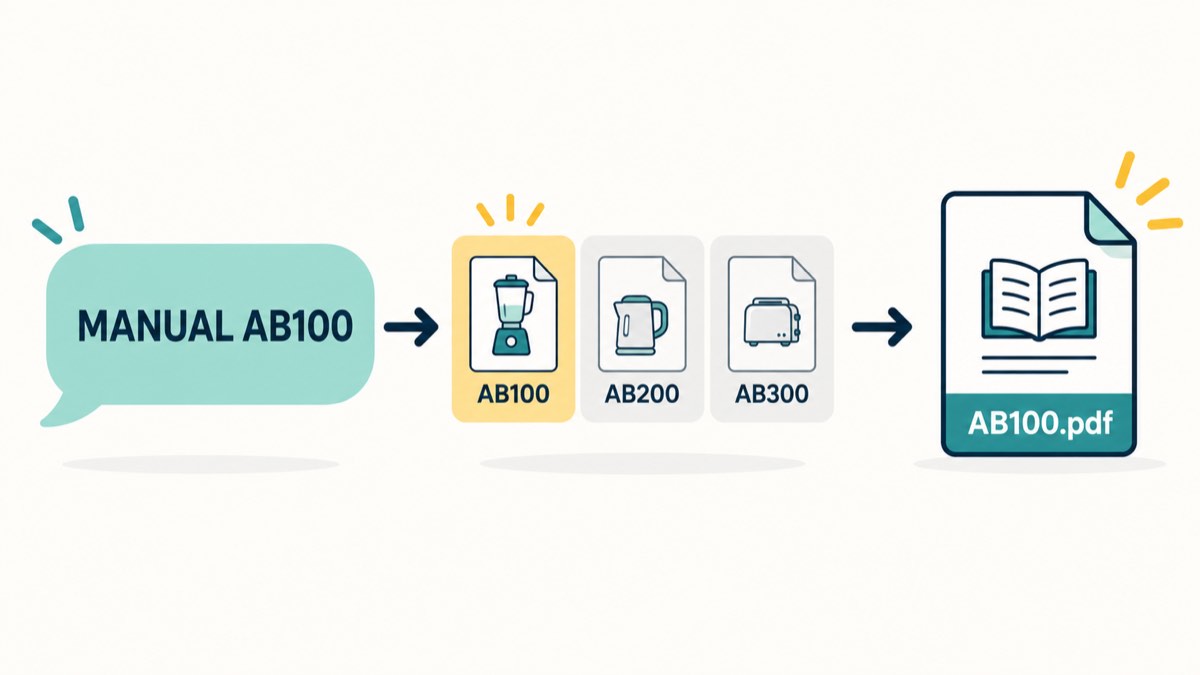
Original illustration of the automation, not a product screenshot or a real customer conversation.
What your customer gets
A customer sends MANUAL AB100 to your connected business number. The flow checks the exact model and sends the matching document with: “Here is the PDF manual for AB100.” A request for AB100S will not receive the AB100 file just because the names look similar.
If the message starts with MANUAL but has no supported model—or includes two models—the flow asks the customer to send one supported model code. A normal message such as “What time do you close?” gets no reply from this workflow. Your usual team or other configured tools can handle it.
The flow responds to individual incoming text messages where Wassenger provides the sender’s phone number. It skips chats identified only by a hidden-number ID, as well as groups, outgoing messages and media. It does not read photos of labels, answer repair questions or search the internet for a replacement manual. That limited job makes the result easy for you to check.
1. Choose the manuals you want to send
Start with a few products rather than your whole catalogue. For each one, choose the correct manual, language and revision. Use a public HTTPS link to the actual PDF that Wassenger can fetch without signing in. Check that you have permission to share the document.
| Example model | Document you provide |
|---|---|
| AB100 | Your approved PDF for AB100 |
| AB200 | Your approved PDF for AB200 |
| AB300 | Your approved PDF for AB300 |
Open each link yourself and check the first page against the product label. A link can work perfectly and still point to the wrong model. Keep the model-to-document list under your control; this workflow never chooses a URL supplied by a customer.
The JSON contains example.com links as placeholders. They are not sample manuals. Replace them before testing: the workflow stops rather than sending a known-model request with an unchanged placeholder.
2. Import the workflow and connect your number
You need a connected Wassenger number and an account with Flows access enabled. This example uses the integrated Flows builder, not a WhatsApp Flows form. Check your account's access before starting; no separate AI account is needed.
Import the complete JSON below into Flows. It starts inactive. Then make these changes:
- In Wassenger Trigger, connect your Wassenger credential and select your business number. Keep the incoming-message event selected.
- In Choose the exact manual, replace the three PDF links at the top of the code. For your own catalogue, update the model keys and the clarification message together. Keep the remaining matching logic unchanged unless you intend to change its behaviour.
- Connect the same Wassenger credential in Send PDF with Wassenger and Ask for one model.
You do not enter a customer's number in the workflow. Both reply nodes use the sender of the incoming message, after the flow has checked that it belongs to an individual chat on your selected number.
The five nodes do one small job: receive the request, choose the model, check whether it is known, then send either its document or a clarification. The Flows documentation explains the builder and message triggers if you need help with access or importing.
3. Check the result before leaving it running
After replacing the links and connecting credentials, enable the workflow for your selected number so it can receive incoming requests. Then send the tests from another number you control. Use a number where a second bot will not also answer these requests. Check the WhatsApp conversation itself, including the received file, before relying on the automation.
| Send this test message | Expected behaviour |
|---|---|
MANUAL AB100 |
The approved AB100 PDF and its short reply |
manual ab200 |
The AB200 PDF; case and surrounding spaces are normalized |
MANUAL AB100S |
A request for one of your supported model codes |
MANUAL AB100 AB200 |
A request for one model at a time |
What time do you close? |
No response from this workflow |
Open the received PDFs, not just their filenames. Once those checks work in your account, leave the workflow active for incoming requests and tell customers the command they can use: “For your manual, send MANUAL followed by the model on the label.”
Keep these limits in mind: each incoming request is handled separately, so sending the same command again can send the file again. The workflow has no duplicate-event memory or automatic handoff. If a file request fails, check the execution and the conversation; it does not send a second message claiming the document arrived. A successful API request alone does not prove delivery.
Copy the complete workflow
The resource below uses native Wassenger receive and send nodes. Replace the configuration described above; it contains no credentials or working manual URLs. It is supplied inactive so importing it does not start responding to customers.
{
  "id": "wassengerProductManual",
  "name": "Wassenger - Send the exact product manual",
  "nodes": [
    {
      "id": "a70002bf-ee84-4a2e-a8ca-a0cba9d5d717",
      "name": "Wassenger Trigger",
      "type": "n8n-nodes-wassenger.wassengerTrigger",
      "typeVersion": 1,
      "position": [
        0,
        0
      ],
      "parameters": {
        "webhookName": "Product manual requests",
        "device": "REPLACE_WITH_YOUR_DEVICE_ID",
        "events": [
          "message:in:new"
        ],
        "sampleEvent": "inbound-text"
      }
    },
    {
      "id": "7b9dcdb8-175a-4e64-bf59-b2ddf98dfcea",
      "name": "Choose the exact manual",
      "type": "n8n-nodes-base.code",
      "typeVersion": 2,
      "position": [
        240,
        0
      ],
      "parameters": {
        "mode": "runOnceForAllItems",
        "jsCode": "// Replace these three placeholders with public HTTPS URLs to your approved PDFs.\nconst manuals = {\n  AB100: 'https://example.com/manuals/AB100.pdf',\n  AB200: 'https://example.com/manuals/AB200.pdf',\n  AB300: 'https://example.com/manuals/AB300.pdf'\n};\nconst event = $json;\nconst data = event.data;\nconst selectedDevice = $node['Wassenger Trigger'].parameter.device;\nif (event.event !== 'message:in:new' || data?.flow !== 'inbound' || data?.type !== 'text') return [];\nif (!/^[a-f0-9]{24}$/.test(selectedDevice) || event.device?.id !== selectedDevice) return [];\nif (typeof data.body !== 'string' || typeof data.fromNumber !== 'string' || !/^\\+[1-9]\\d{7,14}$/.test(data.fromNumber)) return [];\nconst chat = typeof data.chat === 'string' ? data.chat : (data.chat?.type === 'chat' ? data.chat.id : '');\nif (chat !== data.fromNumber.slice(1) + '@c.us' || data.meta?.isGroup === true) return [];\nconst command = data.body.trim().replace(/\\s+/g, ' ').toUpperCase();\nif (!/^MANUAL(?: |$)/.test(command)) return [];\nconst match = /^MANUAL ([A-Z0-9]+)$/.exec(command);\nconst model = match?.[1];\nif (!model || !Object.prototype.hasOwnProperty.call(manuals, model)) {\n  return [{ json: { kind: 'clarify', reply: 'Please check the model on the product label and send one exact command: MANUAL AB100, MANUAL AB200 or MANUAL AB300.' } }];\n}\nconst manualUrl = manuals[model];\nif (!manualUrl.startsWith('https://') || manualUrl.startsWith('https://example.com/')) {\n  throw new Error('Replace the HTTPS PDF URL for ' + model);\n}\nreturn [{ json: { kind: 'document', model, manualUrl, reply: 'Here is the PDF manual for ' + model + '.' } }];"
      }
    },
    {
      "id": "62acbe30-80d8-4248-bf48-1ea87c22dc30",
      "name": "Known model?",
      "type": "n8n-nodes-base.if",
      "typeVersion": 2.2,
      "position": [
        480,
        0
      ],
      "parameters": {
        "conditions": {
          "options": {
            "caseSensitive": true,
            "leftValue": "",
            "typeValidation": "strict",
            "version": 2
          },
          "conditions": [
            {
              "id": "abcb3f59-97c6-4ba3-8f2b-66160b9e91dd",
              "leftValue": "={{ $json.kind }}",
              "rightValue": "document",
              "operator": {
                "type": "string",
                "operation": "equals"
              }
            }
          ],
          "combinator": "and"
        },
        "options": {}
      }
    },
    {
      "id": "57f50033-5f89-4884-8c85-068c6c6db094",
      "name": "Send PDF with Wassenger",
      "type": "n8n-nodes-wassenger.wassenger",
      "typeVersion": 1,
      "position": [
        720,
        -120
      ],
      "parameters": {
        "resource": "send-messages",
        "device": "={{ $('Wassenger Trigger').item.json.device.id }}",
        "target": "phone",
        "phone": "={{ $('Wassenger Trigger').item.json.data.fromNumber }}",
        "message": "={{ $json.reply }}",
        "options": {},
        "operation": "sendMedia",
        "mediaUrl": "={{ $json.manualUrl }}"
      }
    },
    {
      "id": "69061c20-5f10-433e-81b3-85f635047ca4",
      "name": "Ask for one model",
      "type": "n8n-nodes-wassenger.wassenger",
      "typeVersion": 1,
      "position": [
        720,
        120
      ],
      "parameters": {
        "resource": "send-messages",
        "device": "={{ $('Wassenger Trigger').item.json.device.id }}",
        "target": "phone",
        "phone": "={{ $('Wassenger Trigger').item.json.data.fromNumber }}",
        "message": "={{ $json.reply }}",
        "options": {},
        "operation": "sendText"
      }
    }
  ],
  "connections": {
    "Wassenger Trigger": {
      "main": [
        [
          {
            "node": "Choose the exact manual",
            "type": "main",
            "index": 0
          }
        ]
      ]
    },
    "Choose the exact manual": {
      "main": [
        [
          {
            "node": "Known model?",
            "type": "main",
            "index": 0
          }
        ]
      ]
    },
    "Known model?": {
      "main": [
        [
          {
            "node": "Send PDF with Wassenger",
            "type": "main",
            "index": 0
          }
        ],
        [
          {
            "node": "Ask for one model",
            "type": "main",
            "index": 0
          }
        ]
      ]
    }
  },
  "active": false,
  "settings": {
    "executionOrder": "v1"
  },
  "pinData": {}
}
Tested with n8n 2.27.4 and native Wassenger nodes 1.2.4: the JSON imported inactive, and 35 input checks plus 37 isolated execution cases passed. Tests used fictional messages and simulated API/file responses. Hosted Flows activation and real WhatsApp delivery were not tested; complete the checks in your own account before using it with customers.
When a manufacturer changes a manual or you add a product, update the matching entry and repeat the file check. Keep a person available for questions the command does not answer. Your first useful result is simple: a customer asks for one model, and receives the right document without someone finding and attaching it each time. Open Wassenger Flows and start with one product you can verify.