A automação do WhatsApp surgiu como uma ferramenta essencial para empresas que buscam melhorar as interações com clientes, otimizar o gerenciamento de agendamentos e minimizar o trabalho manual. Hoje, vamos explorar um fluxo de trabalho simples e eficaz usando n8n e WhatsApp Business que transforma a forma como PMEs e agências gerenciam as comunicações com clientes.
Por que automatizar interações no WhatsApp é essencial
As expectativas dos clientes estão mais altas do que nunca. Respostas imediatas, interações personalizadas e um tratamento de agendamentos impecável tornaram-se a norma, não a exceção. Felizmente, a automação oferece uma solução eficaz:
- Respostas instantâneas garantem que seus clientes se sintam valorizados.
- Redução de tarefas manuais libera tempo da sua equipe.
- Gestão eficiente de dados possibilita melhores insights sobre clientes.
Com o bot do WhatsApp Business usando n8n, você pode alcançar tudo isso de forma integrada.
👉 Inicie seu teste gratuito de 7 dias na Wassenger e aproveite nossos poderosos fluxos de automação do WhatsApp para transformar seu atendimento ao cliente hoje! ⚡
Como funciona a automação do bot do WhatsApp
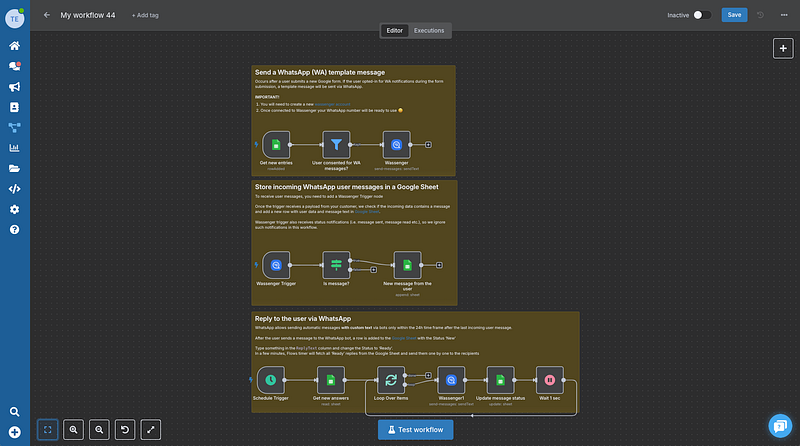
Este fluxo integra Google Forms, WhatsApp e Google Sheets para simplificar a interação com clientes e o gerenciamento de dados:
👉 Inicie seu teste gratuito de 7 dias na Wassenger e aproveite nossos poderosos fluxos de automação do WhatsApp para transformar seu atendimento ao cliente hoje! ⚡
Passo 1: Interação do cliente via Google Forms
Os clientes preenchem um Google Form para solicitar informações, agendar compromissos ou enviar dúvidas. Após o envio, eles recebem automaticamente uma notificação via WhatsApp.
Exemplo: Imagine uma clínica odontológica onde os pacientes agendam seus atendimentos através de um simples Google Form. Assim que o formulário é enviado, eles recebem instantaneamente uma mensagem de confirmação de agendamento diretamente no WhatsApp.
Passo 2: Captura de mensagens dos usuários
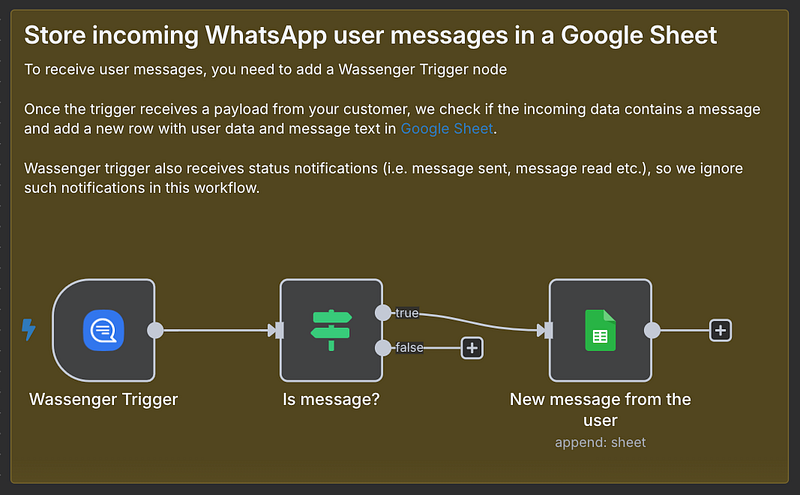
Quando um cliente envia uma mensagem para o seu Wassemger Business bot, a mensagem e os dados de contato são automaticamente adicionados a uma Google Sheet. Isso centraliza os dados dos clientes, tornando-os acessíveis e fáceis de gerenciar para toda a sua equipe.
Cenário: Se um cliente solicitar reagendamento via WhatsApp, a mensagem é registrada diretamente no Google Sheets, garantindo que nada seja perdido.
Passo 3: Gerenciamento fácil de respostas
Responder aos clientes é tão simples quanto atualizar sua Google Sheet. Basta preencher a coluna ReplyText, mudar o status paraReady, e o bot cuida do restante. Em segundos, o n8n identifica essas mensagens e as envia via WhatsApp.
Benefício no mundo real: Suponha que um membro da sua equipe precise retornar múltiplas dúvidas de clientes rapidamente. Ele atualiza cada resposta na planilha e, em instantes, respostas personalizadas chegam a cada cliente pelo WhatsApp.
👉 Registre-se na Wassenger com um teste gratuito de 7 dias para configurar facilmente seu próprio fluxo de atendimento no WhatsApp e automatizar suas interações hoje! 🚀
Personalizando o fluxo de trabalho para suas necessidades
A beleza deste fluxo n8n está na sua flexibilidade. Você pode:
- Conectar ferramentas adicionais como sistemas CRM para dados de cliente mais ricos.
- Integrar calendários para agendamento automático de compromissos.
- Melhorar notificações com templates dinâmicos para personalizar a experiência do cliente.
Copie e use este fluxo agora!
{
"name": "Customer Support WhatsApp Bot with Google Docs Knowledge Base and Gemini AI",
"nodes": [
{
"parameters": {
"conditions": {
"options": {
"caseSensitive": true,
"leftValue": "",
"typeValidation": "loose",
"version": 1
},
"conditions": [
{
"id": "8a765e57-8e39-4547-a99a-0458df2b75f4",
"operator": {
"type": "object",
"operation": "exists",
"singleValue": true
},
"leftValue": "={{ $('Wassenger Trigger').item.json }}",
"rightValue": ""
}
],
"combinator": "and"
},
"options": {
"looseTypeValidation": true
}
},
"id": "3237130a-f8dd-4e66-b2bb-f29cbe963427",
"name": "Is message?",
"type": "n8n-nodes-base.if",
"position": [240, 600],
"typeVersion": 2
},
{
"parameters": {
"rule": {
"interval": [
{
"field": "minutes"
}
]
}
},
"id": "1d2ce3be-f107-4949-8753-16ea3a97b7b1",
"name": "Schedule Trigger",
"type": "n8n-nodes-base.scheduleTrigger",
"position": [0, 1020],
"typeVersion": 1.2
},
{
"parameters": {
"options": {}
},
"id": "4f5189fd-a36a-468a-ab7f-512262e192e6",
"name": "Loop Over Items",
"type": "n8n-nodes-base.splitInBatches",
"position": [440, 1020],
"typeVersion": 3
},
{
"parameters": {
"documentId": {
"__rl": true,
"mode": "list",
"value": "1T-B0yepcrCHxQpn7Sj6QjTa0VqwwVBQhO5ZcIUSxWJE",
"cachedResultUrl": "https://docs.google.com/spreadsheets/d/1T-B0yepcrCHxQpn7Sj6QjTa0VqwwVBQhO5ZcIUSxWJE/edit?usp=drivesdk",
"cachedResultName": "WhatsApp Appointments(Responses)"
},
"sheetName": {
"__rl": true,
"mode": "list",
"value": 1621824221,
"cachedResultUrl": "https://docs.google.com/spreadsheets/d/1T-B0yepcrCHxQpn7Sj6QjTa0VqwwVBQhO5ZcIUSxWJE/edit#gid=1621824221",
"cachedResultName": "WA-messages"
},
"filtersUI": {
"values": [
{
"lookupColumn": "Status",
"lookupValue": "Ready"
}
]
},
"options": {}
},
"id": "164042e8-4b56-4432-9b46-dfdf4c93116a",
"name": "Get new answers",
"type": "n8n-nodes-base.googleSheets",
"position": [220, 1020],
"typeVersion": 4.4,
"credentials": {
"googleSheetsOAuth2Api": {
"id": "ckNCFcoJBFt2fiDJ",
"name": "Google Sheets account 8"
}
}
},
{
"parameters": {
"operation": "update",
"documentId": {
"__rl": true,
"mode": "list",
"value": "1T-B0yepcrCHxQpn7Sj6QjTa0VqwwVBQhO5ZcIUSxWJE",
"cachedResultUrl": "https://docs.google.com/spreadsheets/d/1T-B0yepcrCHxQpn7Sj6QjTa0VqwwVBQhO5ZcIUSxWJE/edit?usp=drivesdk",
"cachedResultName": "WhatsApp Appointments(Responses)"
},
"sheetName": {
"__rl": true,
"mode": "list",
"value": 1621824221,
"cachedResultUrl": "https://docs.google.com/spreadsheets/d/1T-B0yepcrCHxQpn7Sj6QjTa0VqwwVBQhO5ZcIUSxWJE/edit#gid=1621824221",
"cachedResultName": "WA-messages"
},
"columns": {
"value": {
"Status": "Replied",
"row_number": "={{ $('Loop Over Items').item.json.row_number }}"
},
"schema": [
{
"id": "UserPhone",
"type": "string",
"display": true,
"removed": true,
"required": false,
"displayName": "UserPhone",
"defaultMatch": false,
"canBeUsedToMatch": true
},
{
"id": "UserName",
"type": "string",
"display": true,
"removed": true,
"required": false,
"displayName": "UserName",
"defaultMatch": false,
"canBeUsedToMatch": true
},
{
"id": "UserMessage",
"type": "string",
"display": true,
"removed": true,
"required": false,
"displayName": "UserMessage",
"defaultMatch": false,
"canBeUsedToMatch": true
},
{
"id": "ReplyText",
"type": "string",
"display": true,
"removed": true,
"required": false,
"displayName": "ReplyText",
"defaultMatch": false,
"canBeUsedToMatch": true
},
{
"id": "Status",
"type": "string",
"display": true,
"required": false,
"displayName": "Status",
"defaultMatch": false,
"canBeUsedToMatch": true
},
{
"id": "row_number",
"type": "string",
"display": true,
"removed": false,
"readOnly": true,
"required": false,
"displayName": "row_number",
"defaultMatch": false,
"canBeUsedToMatch": true
}
],
"mappingMode": "defineBelow",
"matchingColumns": ["row_number"]
},
"options": {}
},
"id": "d31cdbd1-1384-4608-9822-64b643508689",
"name": "Update message status",
"type": "n8n-nodes-base.googleSheets",
"position": [840, 1020],
"typeVersion": 4.4,
"credentials": {
"googleSheetsOAuth2Api": {
"id": "ckNCFcoJBFt2fiDJ",
"name": "Google Sheets account 8"
}
}
},
{
"parameters": {
"amount": 1
},
"id": "c712f711-bc98-412f-940d-69af277c9126",
"name": "Wait 1 sec",
"type": "n8n-nodes-base.wait",
"position": [1020, 1020],
"webhookId": "df4df4f8-378c-4228-b1e2-326b9d956e7e",
"typeVersion": 1.1
},
{
"parameters": {
"operation": "append",
"documentId": {
"__rl": true,
"value": "1D5sI-FJNl6zH9P6DPkyD7-kifKX-TJnChdhsfLji50U",
"mode": "list",
"cachedResultName": "Chat logs",
"cachedResultUrl": "google_drive_url"
},
"sheetName": {
"__rl": true,
"value": "gid=0",
"mode": "list",
"cachedResultName": "Sheet1",
"cachedResultUrl": "google_drive_url"
},
"columns": {
"mappingMode": "defineBelow",
"value": {
"TIMESTAMP": "={{ $json.data.timestamp }}",
"USER": "={{ $json.data.toNumber }}",
"MESSAGE": "={{ $json.data.body }}"
},
"matchingColumns": [],
"schema": [
{
"id": "TIMESTAMP",
"displayName": "TIMESTAMP",
"required": false,
"defaultMatch": false,
"display": true,
"type": "string",
"canBeUsedToMatch": true
},
{
"id": "USER",
"displayName": "USER",
"required": false,
"defaultMatch": false,
"display": true,
"type": "string",
"canBeUsedToMatch": true
},
{
"id": "MESSAGE",
"displayName": "MESSAGE",
"required": false,
"defaultMatch": false,
"display": true,
"type": "string",
"canBeUsedToMatch": true
},
{
"id": "RESPONSE",
"displayName": "RESPONSE",
"required": false,
"defaultMatch": false,
"display": true,
"type": "string",
"canBeUsedToMatch": true,
"removed": true
}
],
"attemptToConvertTypes": false,
"convertFieldsToString": false
},
"options": {}
},
"id": "76e576d5-2bad-4588-a044-4091db02b3f7",
"name": "New message from the user",
"type": "n8n-nodes-base.googleSheets",
"position": [500, 600],
"typeVersion": 4.4,
"credentials": {
"googleSheetsOAuth2Api": {
"id": "ckNCFcoJBFt2fiDJ",
"name": "Google Sheets account 8"
}
}
},
{
"parameters": {
"pollTimes": {
"item": [
{
"mode": "everyX",
"value": 5,
"unit": "minutes"
}
]
},
"documentId": {
"__rl": true,
"mode": "list",
"value": "1T-B0yepcrCHxQpn7Sj6QjTa0VqwwVBQhO5ZcIUSxWJE",
"cachedResultUrl": "google_drive_url",
"cachedResultName": "WhatsApp Appointments(Responses)"
},
"sheetName": {
"__rl": true,
"mode": "list",
"value": 470797219,
"cachedResultUrl": "",
"cachedResultName": "Form Responses 1"
},
"event": "rowAdded",
"options": {}
},
"id": "906a1913-5356-4cb1-936b-489afcb58153",
"name": "Get new entries",
"type": "n8n-nodes-base.googleSheetsTrigger",
"position": [20, 160],
"typeVersion": 1,
"credentials": {
"googleSheetsTriggerOAuth2Api": {
"id": "3JS9kFioVK3IrITX",
"name": "Google Sheets Trigger account 2"
}
}
},
{
"parameters": {
"conditions": {
"options": {
"leftValue": "",
"caseSensitive": true,
"typeValidation": "strict"
},
"combinator": "and",
"conditions": [
{
"id": "b9bfdb33-0d9c-4320-b4bc-0bf0a469c8ca",
"operator": {
"name": "filter.operator.equals",
"type": "string",
"operation": "equals"
},
"leftValue": "={{ $json[\"I consent to receive WhatsApp notifications regarding my appointments\"] }}",
"rightValue": "Yes"
}
]
},
"options": {}
},
"id": "88ac4ee1-d83e-46f6-9241-1ad92458c527",
"name": "User consented for WA messages?",
"type": "n8n-nodes-base.filter",
"position": [240, 160],
"typeVersion": 2
},
{
"parameters": {
"content": "## Send a WhatsApp(WA) template message\nOccurs after a user submits a new Google form.If the user opted-in for WA notifications during the form submission, a template message will be sent via WhatsApp.\n\n**IMPORTANT!**\n1.You will need to create a new [wassenger account](https://wassenger.com/register)\n2.Once connected to Wassenger your WhatsApp number will be ready to use:)",
"height": 405,
"width": 745
},
"id": "3f31fb13-7238-4fb3-a2ff-421b8b0f2408",
"name": "Sticky Note",
"type": "n8n-nodes-base.stickyNote",
"position": [-20, -80],
"typeVersion": 1
},
{
"parameters": {
"content": "## Store incoming WhatsApp user messages in a Google Sheet\nTo receive user messages, you need to add a Wassenger Trigger node\n\nOnce the trigger receives a payload from your customer, we check if the incoming data contains a message and add a new row with user data and message text in [Google Sheet](https://docs.google.com/spreadsheets/d/1T-B0yepcrCHxQpn7Sj6QjTa0VqwwVBQhO5ZcIUSxWJE/edit?gid=1621824221#gid=1621824221).\n\nWassenger trigger also receives status notifications(i.e.message sent, message read etc.), so we ignore such notifications in this workflow.",
"height": 458,
"width": 752
},
"id": "b4827163-9ea5-4857-b367-ac8dd02148c8",
"name": "Sticky Note1",
"type": "n8n-nodes-base.stickyNote",
"position": [-20, 340],
"typeVersion": 1
},
{
"parameters": {
"content": "## Reply to the user via WhatsApp\nWhatsApp allows sending automatic messages **with custom text** via bots only within the 24h time frame after the last incoming user message.\n\nAfter the user sends a message to the WhatsApp bot, a row is added to the [Google Sheet](https://docs.google.com/spreadsheets/d/1T-B0yepcrCHxQpn7Sj6QjTa0VqwwVBQhO5ZcIUSxWJE/edit?gid=1621824221#gid=1621824221) with the Status 'New'\n\nType something in the `ReplyText` column and change the Status to 'Ready'.\nIn a few minutes, Flows timer will fetch all 'Ready' replies from the Google Sheet and send them one by one to the recipients",
"height": 369.34131736526945,
"width": 1197.9640718562885
},
"id": "129153f7-ee86-4200-b6c0-06798c431051",
"name": "Sticky Note2",
"type": "n8n-nodes-base.stickyNote",
"position": [-20, 820],
"typeVersion": 1
},
{
"parameters": {
"device": "device_id",
"phone": "={{ $json['Your mobile number'] }}",
"options": {}
},
"type": "n8n-nodes-wassenger.wassenger",
"typeVersion": 1,
"position": [460, 160],
"id": "26d678c0-b581-449a-8540-c6209bf99ced",
"name": "Wassenger",
"credentials": {
"wassengerApiKey": {
"id": "your_api_key",
"name": "Wassenger Key account 9"
}
}
},
{
"parameters": {
"device": "device_id",
"events": ["message:in:new"],
"sampleEvent": "inbound-text"
},
"type": "n8n-nodes-wassenger.wassengerTrigger",
"typeVersion": 1,
"position": [20, 600],
"id": "71c82d9c-1ab6-4b83-9c5a-c0a714d42325",
"name": "Wassenger Trigger",
"webhookId": "38a35cf6-5aa7-434e-9bf3-bcd31717e1d4",
"credentials": {
"wassengerApiKey": {
"id": "your_api_key",
"name": "Wassenger Key account 9"
}
}
},
{
"parameters": {
"device": "device_id",
"phone": "={{ $('Wassenger Trigger').item.json.data.fromNumber }}",
"options": {}
},
"type": "n8n-nodes-wassenger.wassenger",
"typeVersion": 1,
"position": [660, 1020],
"id": "1fcb9b18-4319-4bf3-b6b3-8be3a09ac969",
"name": "Wassenger1",
"credentials": {
"wassengerApiKey": {
"id": "your_api_key",
"name": "Wassenger Key account"
}
}
}
],
"pinData": {},
"connections": {
"Wait 1 sec": {
"main": [
[
{
"node": "Loop Over Items",
"type": "main",
"index": 0
}
]
]
},
"Is message?": {
"main": [
[
{
"node": "New message from the user",
"type": "main",
"index": 0
}
]
]
},
"Get new answers": {
"main": [
[
{
"node": "Loop Over Items",
"type": "main",
"index": 0
}
]
]
},
"Get new entries": {
"main": [
[
{
"node": "User consented for WA messages?",
"type": "main",
"index": 0
}
]
]
},
"Schedule Trigger": {
"main": [
[
{
"node": "Get new answers",
"type": "main",
"index": 0
}
]
]
},
"Update message status": {
"main": [
[
{
"node": "Wait 1 sec",
"type": "main",
"index": 0
}
]
]
},
"User consented for WA messages?": {
"main": [
[
{
"node": "Wassenger",
"type": "main",
"index": 0
}
]
]
},
"Wassenger Trigger": {
"main": [
[
{
"node": "Is message?",
"type": "main",
"index": 0
}
]
]
},
"Loop Over Items": {
"main": [
[],
[
{
"node": "Wassenger1",
"type": "main",
"index": 0
}
]
]
},
"Wassenger1": {
"main": [
[
{
"node": "Update message status",
"type": "main",
"index": 0
}
]
]
}
},
"active": false,
"settings": {
"executionOrder": "v1"
}
}
Personalização de exemplo: Uma agência de viagens poderia integrar seu CRM para puxar preferências dos clientes e enviar sugestões de viagens altamente personalizadas automaticamente via WhatsApp.
Principais benefícios da automação do WhatsApp com a Wassenger
- Engajamento instantâneo com o cliente: Mantenha altos índices de satisfação com mensagens oportunas e relevantes.
- Eficiência operacional: Reduza esforços manuais e simplifique tarefas de comunicação.
- Soluções escaláveis: Gerencie facilmente bases de clientes em crescimento e fluxos de trabalho complexos.

Descubra os Wassenger Flows com a tecnologia do n8n
Começando com a Wassenger e o n8n
Pronto para elevar seu atendimento ao cliente e automatizar suas comunicações?
👉 Inscreva-se na Wassenger com um teste gratuito de 7 dias e descubra como é fácil integrar uma automação poderosa do WhatsApp ao seu negócio.
Leve as interações com seus clientes de boas para excepcionais, uma mensagem automática do WhatsApp por vez. 🎉